Lifecycle hooks
Lifecycle hooks are the setup scripts of a template. Each hook is a Bash script that runs at one moment in a session's life:
| Hook | When it runs | Usage |
|---|---|---|
| On create | Once, when the session is created | Clone a repository, install dependencies, build |
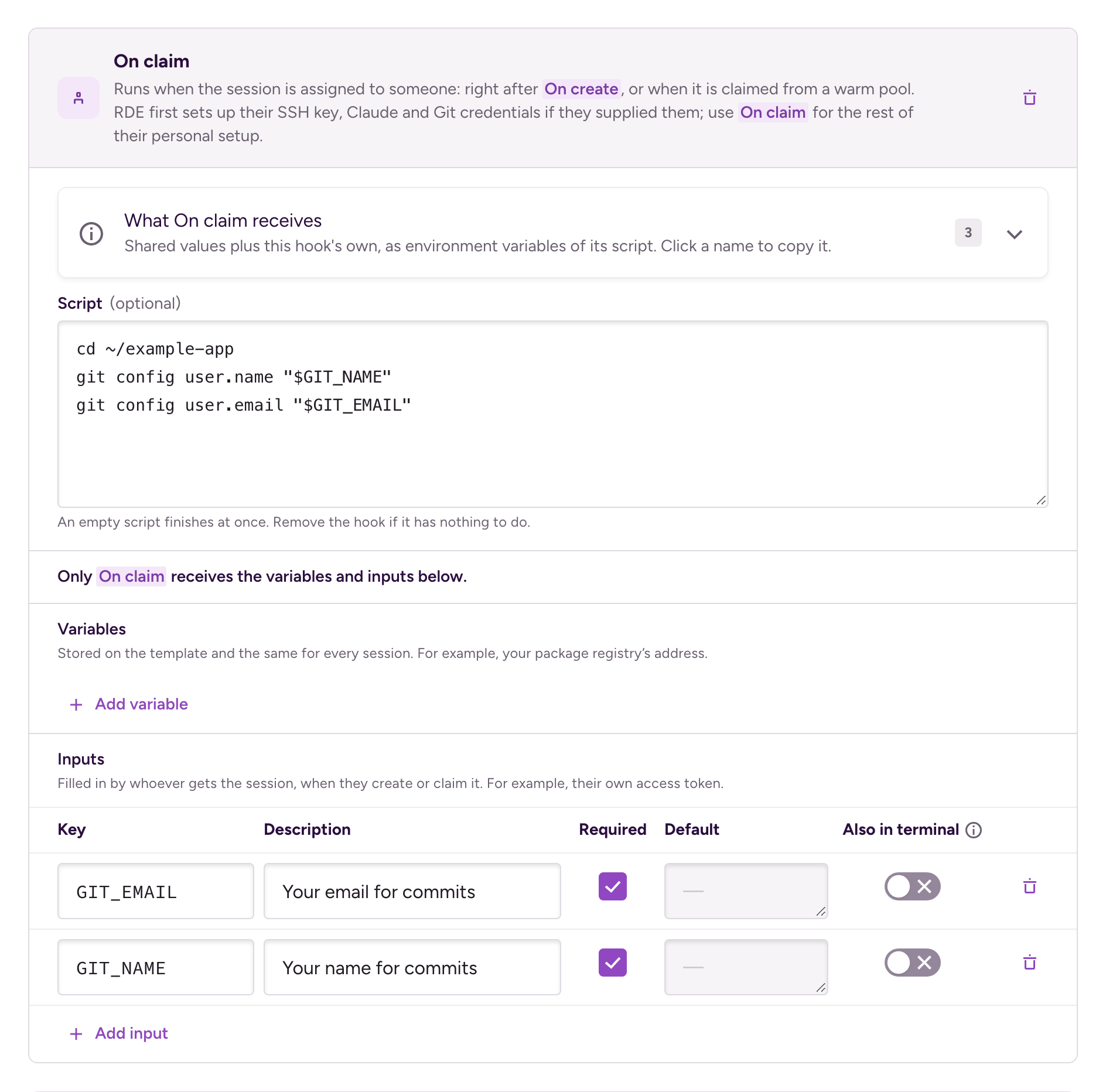
| On claim | When the session is assigned to someone | Set up that person's own tokens and tools |
| On restore | Every time a stopped session is restored | Restart services or a simulator |
Every hook is optional, so add only the ones your template needs. A template without hooks gives you a session you can use as soon as its machine boots.
The same template works for sessions you create directly and for sessions claimed from a warm pool. Lifecycle hooks replace the warmup and startup scripts of older templates. See Converting a template with warmup and startup scripts.
When each hook runsClick to copy link
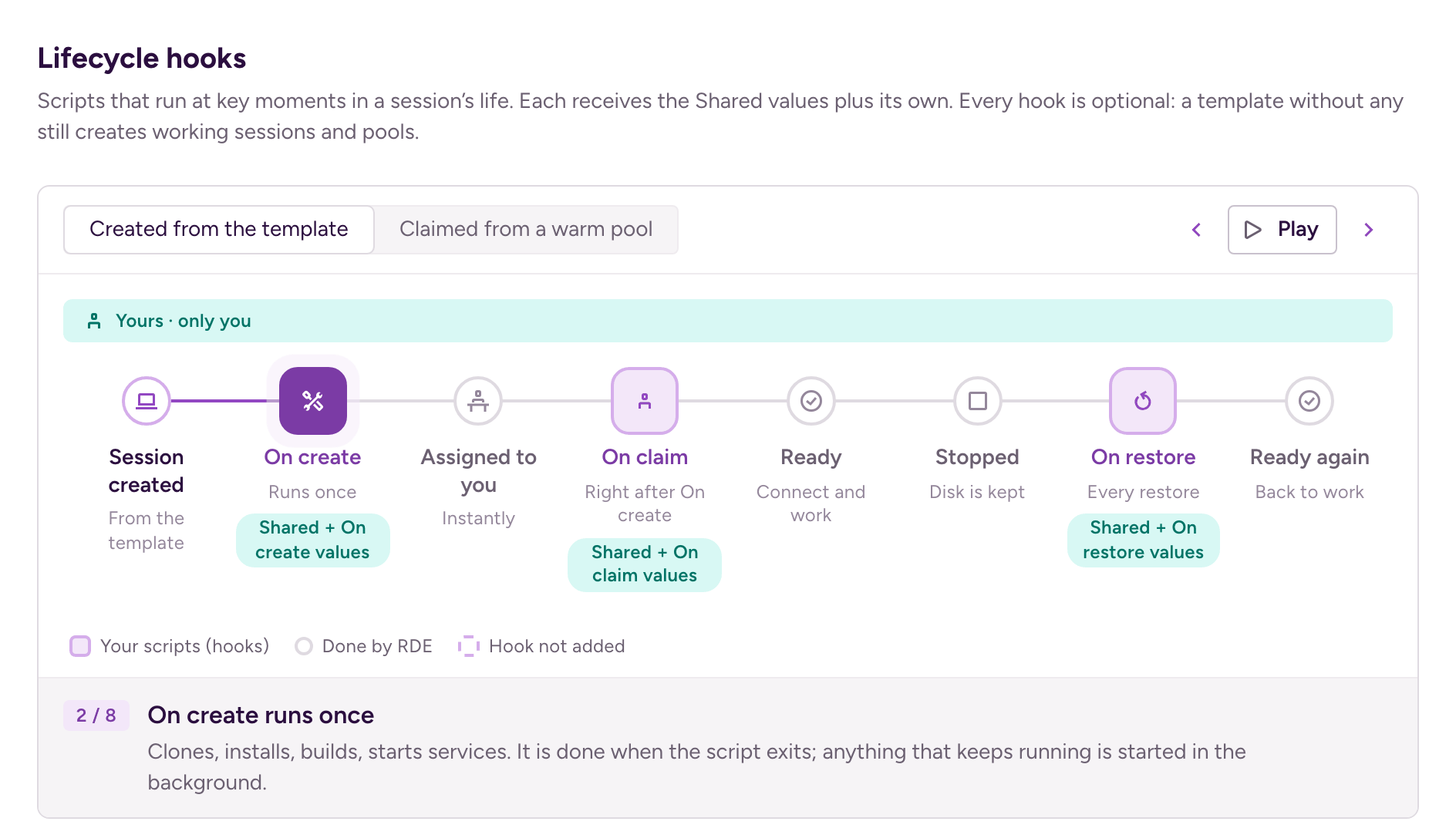
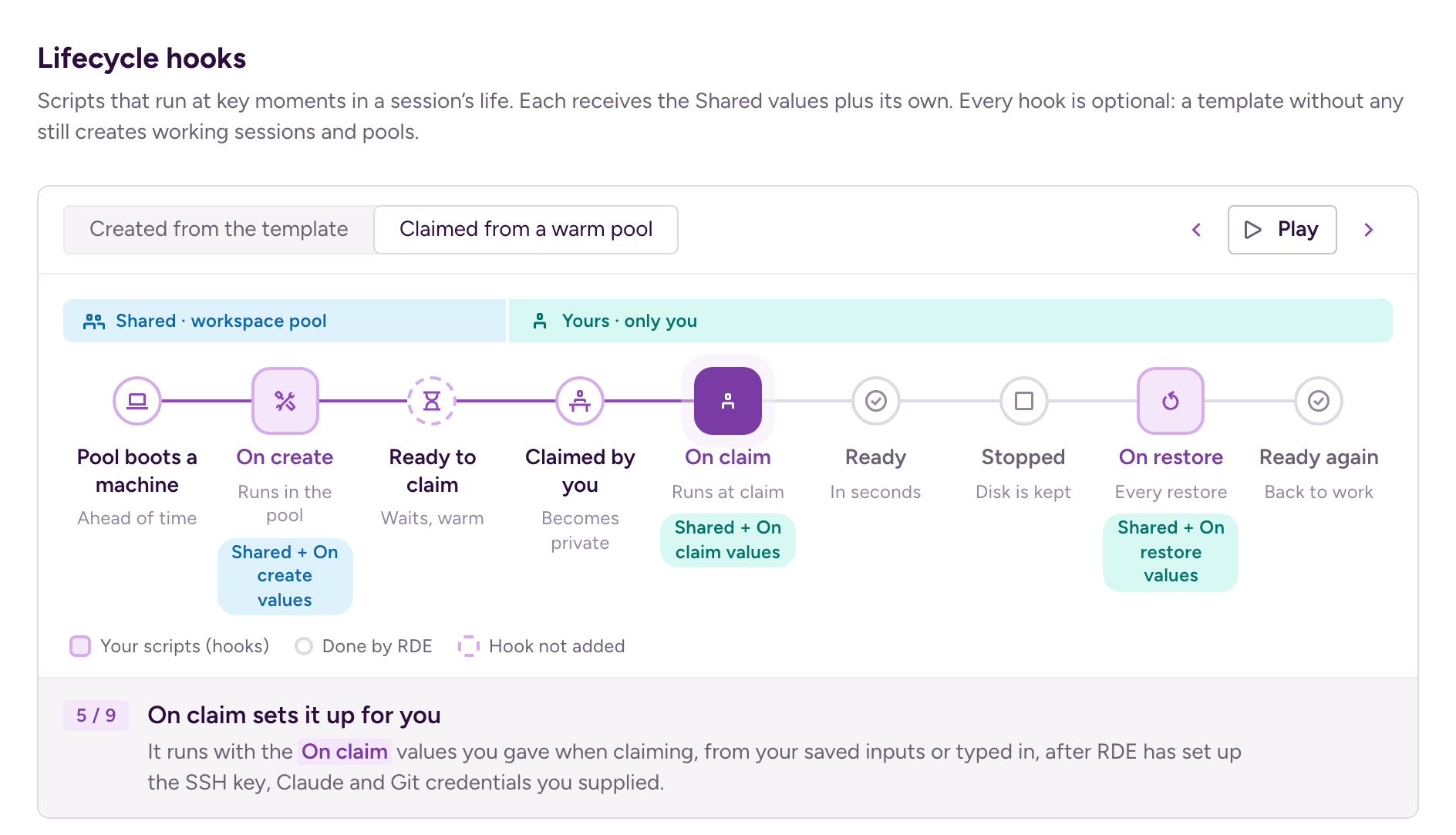
Whether you create a session directly or claim it from a warm pool, the hooks run in the same order. The difference is when:
| Moment | Direct session | Session from a warm pool |
|---|---|---|
| Creation | On create | On create, in the pool, before anyone asks for the session |
| Assigned to someone | System setup, then On claim, right after On create | System setup, then On claim, when you claim it |
| Restore | On restore | On restore |
System setup is Bitrise's own step, not a hook. It sets up the owner's SSH key and Claude credentials, if they supplied them. For a session claimed from a warm pool, if the owner turned on the GitHub integration, it also signs them in to GitHub, so git and gh work as them and their commits carry their GitHub identity. A direct session gets its GitHub sign-in when the machine boots instead. System setup runs only when a person gets the session: a workspace-owned session skips it.
GitHub access for hooks depends on the session type. It applies only if the owner turned on the GitHub integration:
- On claim can use the owner's GitHub access. On a direct session, the integration is set up when the machine boots. On a session claimed from a warm pool, System setup signs the owner in before On claim runs.
- On create can use the owner's GitHub access on a direct session only.
- On create in a warm pool needs a token of its own, because the session has no owner while On create runs.
A few rules hold for every session:
- Hooks run one at a time. On claim waits for On create, and if On create or System setup fails, On claim doesn't run.
- On create and On claim run once per machine. A restore runs only On restore.
- An added hook runs even if its script is empty. It finishes at once.
Because On claim also runs right after On create on a direct session, a template written for warm pools works without a pool too.
The template editor shows the same timeline above the hooks. Created from the template shows a direct session:
Claimed from a warm pool shows a session from a pool. The pool runs On create while the session is still shared, and the rest runs once it's yours:
Writing a hookClick to copy link
A hook runs as the session user, in Bash, and starts in the home directory. It receives the variables and inputs of its scope as environment variables.
A hook is done when its script exits. Exit code 0 means it succeeded, any other exit code means it failed. Bitrise doesn't wait for anything else, so start long-running work, like a dev server, in the background and let the script exit:
cd ~/example-app
nohup npm run dev > ~/dev-server.log 2>&1 &
A background process keeps the environment it started with, including secrets. If the process doesn't need a secret, remove it with env -u:
env -u REPO_TOKEN nohup npm run dev > ~/dev-server.log 2>&1 &
This matters most in a warm pool: whoever claims the session can read the environment of a process that On create left running.
Keep these in mind:
- Nobody can connect while On create runs. The terminal, SSH, remote access, and file transfers open when On create finishes. You can read its log in the meantime. If On create is still running after 2 hours, Bitrise ends it and marks it failed with exit code 124, so start long-running work in the background.
- A stop keeps the disk, not the processes. Cloned repositories and installed tools survive a restore. Running services, simulators, and files in
/tmpdon't, so restart them in On restore. - Hooks don't wait for a virtual device. On a device session, the simulator or emulator boots alongside the hooks, so it may not be ready yet when On create or On restore runs. A script or AI agent that uses the device waits for both the setup and the device to be ready.
bitrise-cli rde session create --waitdoes this for you.
Variables and inputsClick to copy link
A template carries two kinds of values:
- Variables are stored on the template and are the same for every session. For example, a repository URL.
- Inputs are filled in for each session. For example, a branch to check out, or a personal access token.
Every variable and input belongs to one scope, and the scope decides which hooks receive it:
| Scope | Received by |
|---|---|
| Shared | Every hook |
| On create | On create only |
| On claim | On claim only |
| On restore | On restore only |
A hook receives the Shared values plus the values of its own scope. If a hook's own value has the same key as a Shared one, the hook's value wins. The same key can exist in several scopes, and one value or saved input then fills all of them.
Who fills in the inputs depends on how the session starts:
- A direct session: whoever creates it fills in every input, in every scope.
- A warm pool: the Shared and On create inputs are set once, on the pool. Whoever claims a session fills in the On claim and On restore inputs, typed in or from their saved inputs. A session kept as a shared (Org-owned) session accepts typed plain values only.
Nobody is asked for anything at restore: On restore inputs are filled in up front.
Secret and protected variablesClick to copy link
Every variable has a visibility:
| Visibility | What it means |
|---|---|
| Plain | Readable by anyone who can see the template |
| Secret | Encrypted and masked; members with access can reveal it |
| Protected | Secret and write-only: you can replace it, but never see it again |
Also in terminalClick to copy link
Hooks always receive their values. Switch on Also in terminal to also write a value to the session's shell profile, so your terminal and SSH sessions see it too. Shared values are written when the session is created, and a hook's own values when that hook runs. If two of them have the same key, the one written last wins. Protected values can't be written to the terminal.
Values in a warm poolClick to copy link
On claim and On restore receive the Shared values, so whoever claims a session from a pool gets the Shared values too. Keep a value that only the pool should use, like a token to clone the repository, in On create instead.
The page of a claimed session doesn't show the values of its On create inputs: it lists them as set on the pool. But a Shared or On create value with Also in terminal switched on stays in the machine's shell profile, where the claimer can read it.
Using hooks with a warm poolClick to copy link
A warm pool runs only On create. A warm session is ready to claim once On create succeeds, and everything else runs after the claim. To get the most out of a pool:
- Put the slow setup in On create: cloning, installing, building.
- Give On create shared credentials, like a read-only bot token. Saved inputs are personal, so a pool can't use them.
- Put personal setup in On claim, with On claim inputs that whoever claims fills in.
- Don't ask for a GitHub token in On claim. If whoever claims has the GitHub integration turned on, System setup signs them in to GitHub before On claim runs.
A template without On create gives the pool nothing to prepare, so its sessions are ready to claim as soon as they boot. The pool form warns you when the template has no On create, and notes when it has no On claim. Both messages link to the template editor.
To serve device preview links from a pool, the template can't have required On claim or On restore inputs, because nobody is there to fill them in. Give those inputs a default value instead.
Example: an iOS app templateClick to copy link
This template prepares an iOS app repository. It works for direct sessions and for a warm pool alike.
On create clones the repository with a read-only bot token and installs the dependencies. The token is a secret On create input, so it never reaches On claim, On restore, or whoever claims the session:
git clone "https://x-access-token:${REPO_TOKEN}@github.com/example-org/example-app.git" ~/example-app
cd ~/example-app
# Keep the token out of the clone's configuration.
git remote set-url origin https://github.com/example-org/example-app.git
bundle install
bundle exec pod install
On claim sets the Git identity of whoever gets the session, from the On claim inputs GIT_NAME and GIT_EMAIL:
cd ~/example-app
git config user.name "$GIT_NAME"
git config user.email "$GIT_EMAIL"
A team that uses the GitHub integration can leave this hook out: System setup already sets the commit identity of whoever gets the session.
On restore starts the app's mock server again, because a stop ends every running process:
cd ~/example-app
nohup ./scripts/start-mock-server.sh > ~/mock-server.log 2>&1 &
The values:
| Key | Kind | Scope |
|---|---|---|
APP_ENV | Variable, plain, Also in terminal | Shared |
REPO_TOKEN | Input, secret | On create |
GIT_NAME | Input, required | On claim |
GIT_EMAIL | Input, required | On claim |
APP_ENV is Shared, so every hook receives it. With Also in terminal switched on, your terminal sees it too.
Following a session's setupClick to copy link
The Lifecycle card on the session's page shows where the setup is, every hook run with its result, and each hook's log:
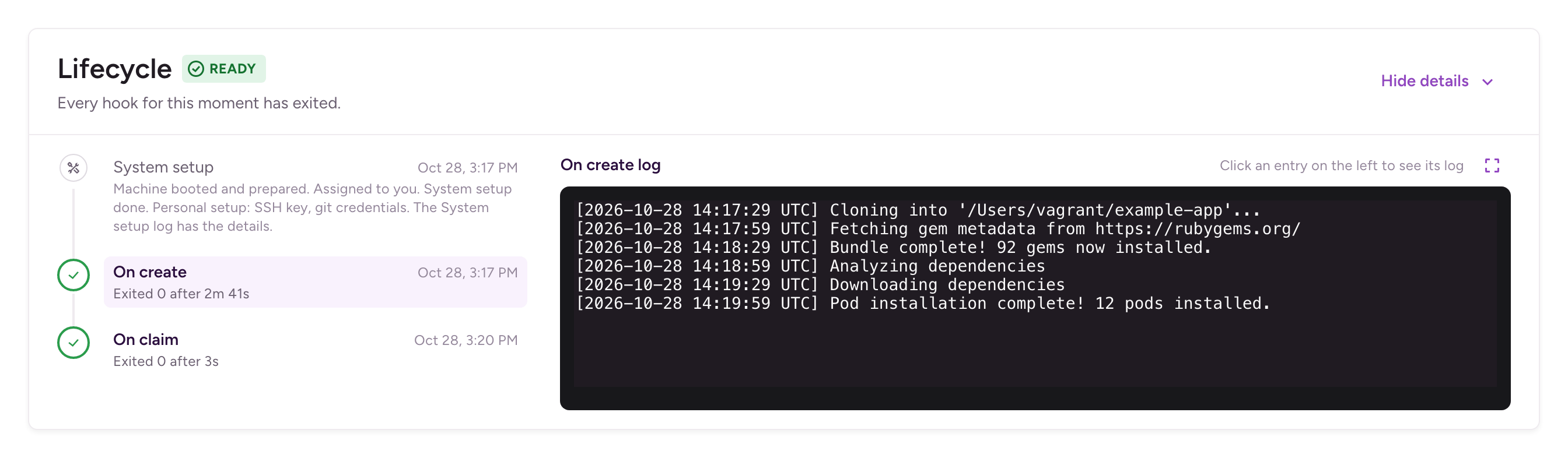
The card's label tells you what the session is doing:
| Label | What it means |
|---|---|
| Setting up | On create is running. You can connect once it finishes. |
| Personalizing | System setup and On claim are running. You can already connect. |
| Restoring | On restore is running after a restore. |
| Ready | Every hook for this moment has finished. |
| Setup failed | On create failed. |
| Personalization failed | System setup or On claim failed. |
| Restore script failed | On restore failed. |
On a warm pool's page, a session that hasn't been claimed yet shows Warming up while On create runs, and Ready to claim when it's done.
A session is Running as soon as its machine is up, which is before On create finishes. If a script or an AI agent drives the session, wait for Ready instead. bitrise-cli rde session create --wait does this for you.
Each hook has its own log, and so does System setup. Logs are kept across restores, so you can still read how On create ran after the session has been stopped and restored.
When a hook failsClick to copy link
A failed hook doesn't break the session. It stays usable, and its log shows what went wrong. Bitrise stops any process the failed hook left running.
- On claim or On restore failed: click Run On claim again or Run On restore again on the Lifecycle card. The hook runs again on the same machine, and everything on the machine stays as it is.
- System setup failed: click Retry system setup. On claim was skipped behind it, so when System setup succeeds, click Run On claim to finish the setup.
- On create failed: click Rebuild. Rebuild discards the machine and its disk, and boots a fresh one for the same session. On create runs again from the start, followed by System setup and On claim. On create can't run again on the same machine.
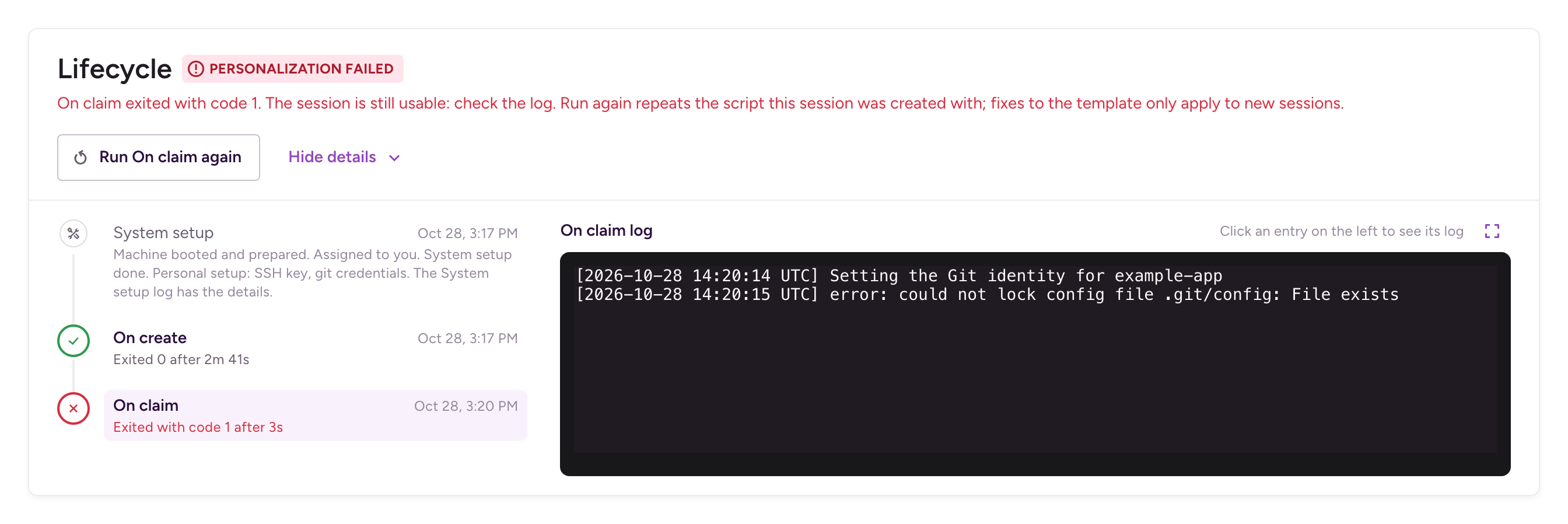
Running a hook again and Rebuild both repeat the script the session was created with. If the hook failed because of a mistake in the script, fix the template, then create a new session to use the fix.
When On create fails in a warm poolClick to copy link
If On create fails, the pool replaces the machine and tries again. After three failures in a row, the pool shows Setup failed and stops warming:
- Nobody can claim from the pool until you fix it.
- The pool keeps the last failed machine as a session you can open, read the log of, and connect to. It stops automatically after four hours.
- Once you fix the cause, click Retry on the pool's page. Retry deletes the failed machine and the pool starts warming again. Changing the template or the pool's configuration also starts it again.
Converting a template with warmup and startup scriptsClick to copy link
New templates always use lifecycle hooks. Templates created before lifecycle hooks have a warmup script and a startup script instead, and they keep working without any change. Bitrise runs them as hooks:
- On create runs the warmup script, then starts the startup script in the background.
- On restore starts the startup script in the background.
- Every variable and input is Shared.
To edit such a template with hooks, convert it:
- Open the template and click Edit template.
- In the Scripts section, click Convert to lifecycle hooks. The editor shows the hooks that the template runs today. If the warmup or startup script has unsaved changes, save them first: the button stays disabled until you do.
- Review the hooks, move values to a hook's scope if only that hook needs them, and click Save changes.
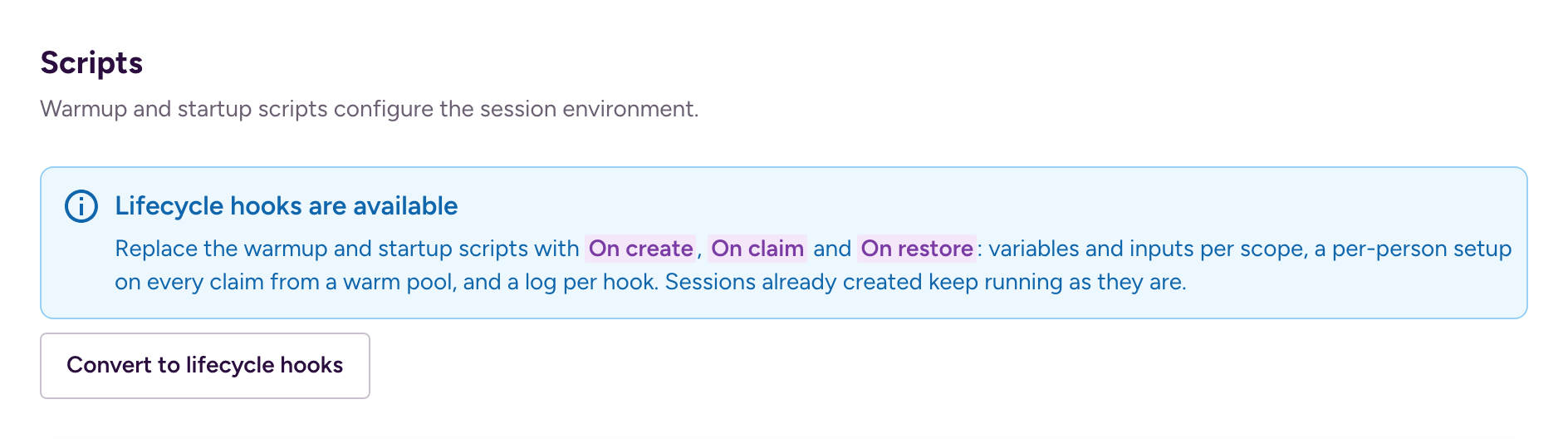
Once saved, a template can't go back to warmup and startup scripts. Sessions already created from it keep running as they were created.
Managing hooks from the CLI, an AI agent, or the APIClick to copy link
- CLI
- AI agent (MCP)
- API
Hooks go in the template's spec file, as the hooks object. The hook key of a variable or input sets its scope; leave it out for Shared:
{
  "name": "iOS app",
  "stack_id": "STACK_ID",
  "machine_type": "MACHINE_TYPE",
  "hooks": {
    "on_create": "git clone https://github.com/example-org/example-app.git ~/example-app",
    "on_claim": "cd ~/example-app && git config user.email \"$GIT_EMAIL\"",
    "on_restore": ""
  },
  "session_inputs": [
    { "key": "GIT_EMAIL", "required": true, "hook": "on_claim" }
  ]
}
bitrise-cli rde template create --file template.json
A hook in the hooks object runs, even with an empty script like on_restore above. Leave a hook out to not have it.
To follow and fix a session's setup:
| Command | What it does |
|---|---|
bitrise-cli rde session view SESSION_ID | Show the session's setup phase and every hook run. |
bitrise-cli rde session logs SESSION_ID --stage on-create | Print a hook's log. The stages are on-create, on-claim, on-restore, and personalize for System setup. Add --attempt 2 to see only the second run of a hook. |
bitrise-cli rde session run-hook SESSION_ID --hook on_claim | Run On claim, On restore, or System setup (personalize) again. |
bitrise-cli rde session rebuild SESSION_ID | Discard the machine and run the setup again from On create. |
bitrise-cli rde warm-pool retry WARM_POOL_ID | Start a pool warming again after On create failed three times in a row. |
When you claim from a warm pool, --input sets the On claim and On restore inputs:
Ask for it in plain language, for example: "Create a template that clones example-org/example-app on create and restarts the mock server on restore." The agent passes the hooks to bitrise_devenv_create_template or bitrise_devenv_update_template.
The agent waits for the session's setup to be ready before it runs commands. After a failure, it reads the hook's log with bitrise_devenv_get_logs to find out why. Then it calls bitrise_devenv_run_hook to run the hook again, or bitrise_devenv_rebuild when On create failed. For a warm pool that stopped after failed setups, it calls bitrise_devenv_retry_warm_pool.
Send the hooks in the hooks object of the create template request. On the update template request, also set update_hooks to true. The hook field of a variable or input sets its scope:
curl -X POST "https://api.bitrise.io/rde/v1/workspaces/WORKSPACE_ID/templates" \
  -H "Authorization: token YOUR_TOKEN" \
  -H "Content-Type: application/json" \
  -d '{
    "name": "iOS app",
    "stack_id": "STACK_ID",
    "machine_type": "MACHINE_TYPE",
    "hooks": {
      "on_create": "git clone https://github.com/example-org/example-app.git ~/example-app"
    }
  }'
Every session read has a lifecycle field with the setup phase and every hook run. To run a hook again, or to rebuild a session:
POST /v1/workspaces/{workspace_id}/sessions/{session_id}/hook-runs
POST /v1/workspaces/{workspace_id}/sessions/{session_id}/rebuild
The hook-runs request takes the hook to run, for example {"hook": "on_claim"}.
To read a hook's log, request a stage such as LOG_STAGE_ON_CREATE, LOG_STAGE_ON_CLAIM, LOG_STAGE_ON_RESTORE, or LOG_STAGE_PERSONALIZE for System setup. Add ?attempt=2 to get only the second run of a hook:
GET /v1/workspaces/{workspace_id}/sessions/{session_id}/logs/LOG_STAGE_ON_CREATE
To start a warm pool warming again after its setup failed, send POST /v1/workspaces/{workspace_id}/warm-pools/{warm_pool_id}/retry.