Delta updates
When you deliver an over-the-air update to a device, the time it takes to download and install the update matters for a smooth user experience.
Updates deployed via CodePush typically only change a small portion of the app's code, so downloading and installing the entire bundle would be inefficient. CodePush computes delta updates between your package versions automatically, so only the changes are downloaded and installed.
Delta update mechanismsClick to copy link
A delta update package only contains the changes between the version already installed on the device and the version to install, rather than the full new version.
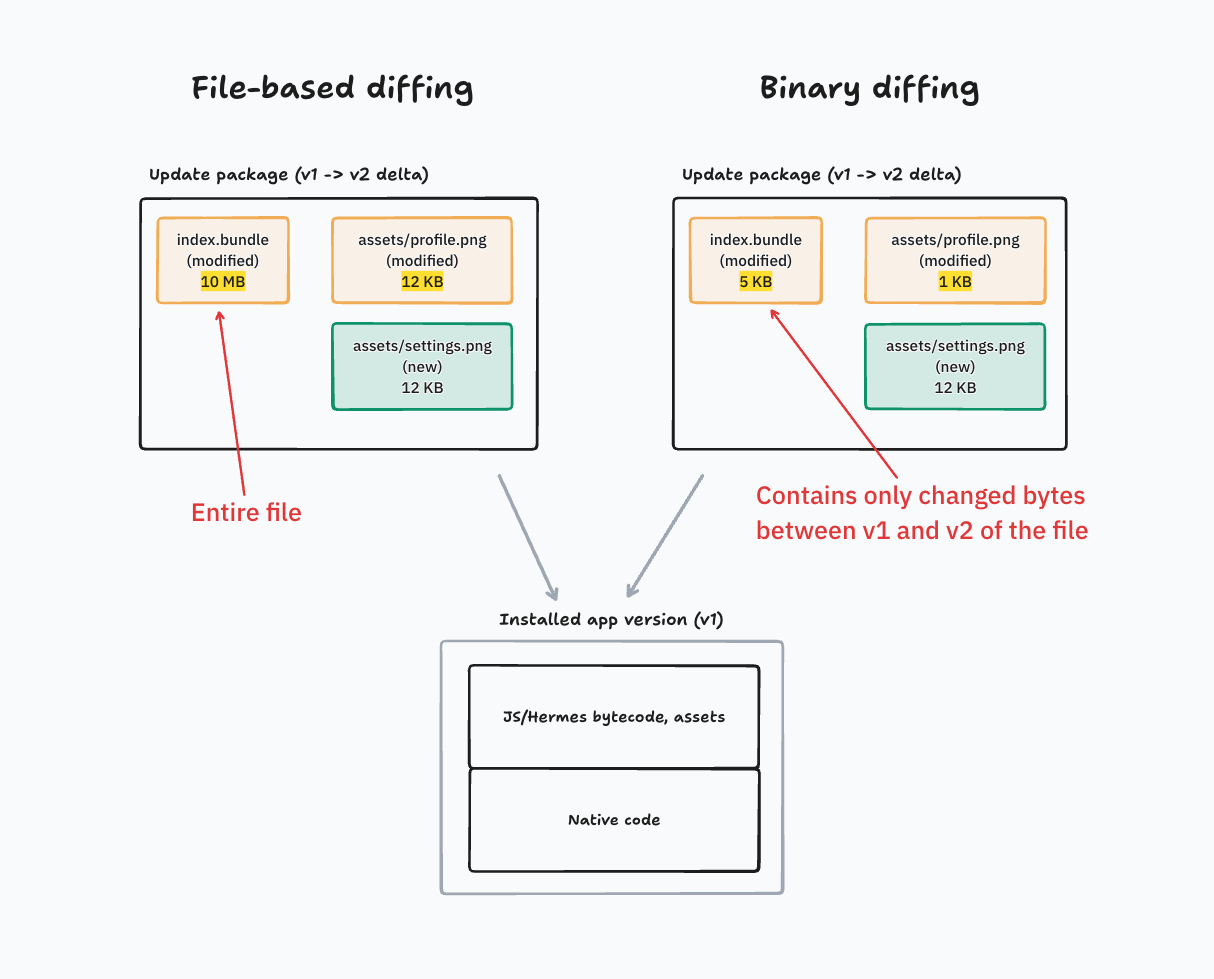
File-level diffing: CodePush compares two releases file-by-file. The update package contains only newly added and changed files in full, plus a list of files to delete. Unchanged files are left out of the package.
Binary diffing: A more efficient diffing mechanism. Like file-level diffing, unchanged files are left out of the package, and the package contains a list of files to delete. For a file that changed between the two versions, CodePush computes a byte-level patch between the old and new versions of that file, and ships the patch instead of the entire file. In most React Native updates, the JS bundle always changes between versions, so this technique avoids fetching the entire JS bundle file.
Delta updates with CodePushClick to copy link
CodePush computes delta updates between your package versions automatically. Delta updates are smaller, so the client SDK downloads and installs them faster. They also reduce your data transfer costs.
File-level diffing is enabled by default and works across all popular CodePush SDK implementations. The Bitrise CodePush SDK supports the more efficient binary diffing starting with version 10.6.1.
Binary diffing is currently opt-in. To enable it, set CodePushEnableDeltaUpdates to true in your app configuration:
- Expo CNG
- iOS
- Android
When using Expo's Continuous Native Generation feature, add the following keys to your app.json file. For the full configuration, see Configuring CodePush for Expo apps.
[
"@bitrise/code-push-sdk/expo",
{
  "ios": {
    "CodePushDeploymentKey": "...",
    "CodePushServerURL": "https://<workspace-slug>.codepush.bitrise.io",
+   "CodePushEnableDeltaUpdates": true
  },
  "android": {
    "CodePushDeploymentKey": "...",
    "CodePushServerURL": "https://<workspace-slug>.codepush.bitrise.io",
+   "CodePushEnableDeltaUpdates": true
  }
}
]
Add the following key to your Info.plist:
<key>CodePushEnableDeltaUpdates</key>
<true/>
Add the following to res/values/strings.xml:
<bool name="CodePushEnableDeltaUpdates">true</bool>
How deltas are created between updatesClick to copy link
CodePush deltas are computed on the server side automatically when a new update is created. A delta is always relative to a previous update, and Bitrise generates deltas between the newly created update and the previous five updates. As a concrete example:
When update v8 is created, delta packages are generated for v8 relative to v7, v6, v5, v4 and v3. Apps upgrading from any of these previous versions to v8 will receive the smaller delta package. Apps upgrading from v1, v2 or a store release (bundle shipped as part of a binary app store release) will receive the full update.
Bitrise generates deltas only against earlier CodePush updates, never against the bundle in the store binary. For this reason, the first CodePush update of a binary release has no deltas, and clients download the full package.
Delta updates, including binary diffing, also work with signed updates. For more information, see Code signing with CodePush.
Verifying delta updatesClick to copy link
You can verify delta updates in two ways: check on the server which deltas Bitrise created, or check on a device that the SDK applied them.
Checking delta generation for an updateClick to copy link
To see which deltas Bitrise created for an update, run update status with the CodePush CLI:
bitrise :codepush update status Staging --label v13
The output includes the delta generation state and one line for each earlier update that has a delta:
Update              v13
Status              processed_valid
Delta generation    completed
Delta from v12      file-level diff, binary patch
Delta from v9, v11  file-level diff
Delta generationispendingwhile Bitrise builds the deltas, andcompletedwhen they are ready for download.- Each
Delta fromline names the earlier update by its version label. Several labels on one line mean that those updates share the same package. If no update with that package is left in the deployment, the line shows the shortened package hash instead. - A
completedstate with noDelta fromlines means clients download the full package. - For machine-readable output, add the
--jsonflag.
Checking delta updates on a deviceClick to copy link
Starting with version 10.6.1, the Bitrise CodePush SDK logs its configuration at startup and each step of an update installation. To check that a device uses binary diffing, look for these log lines:
- On startup, the
Configurationline showsdeltaUpdates=truewhen binary diffing is enabled. - During installation,
Applying diff update. binaryDiff=true patchedFiles=<count>shows that the device received a delta package with binary patches. A file-level delta without binary patches logsbinaryDiff=false. For a full package, the log showsApplying full update.instead. - After patching,
Applied <count> binary diff patches.confirms that the SDK applied the patches.
To stream these logs from a connected Android device or iOS simulator, use bitrise :codepush debug android or bitrise :codepush debug ios.