Creating and releasing CodePush updates
Create an update bundle and upload it to the Bitrise CodePush Server to push updates to your users' devices.
This guide describes the general process of releasing your CodePush updates. We recommend using Bitrise CI to automate the process: CodePush updates with Bitrise CI.
Getting your CodePush credentialsClick to copy link
If you use the GUI on bitrise.io to release your CodePush updates, you can skip this section.
You need the following deployment credentials to be able to release CodePush updates with the API:
-
A deployment ID from Bitrise CodePush.
iOS and Android require separate deployment IDs.
-
An app ID from Bitrise Release Management.
iOS and Android require separate app IDs.
-
A deployment key.
iOS and Android require separate deployment keys.
-
A Bitrise API token: it can be either a personal access token or a workspace API token.
You can save these credentials when creating the CodePush deployment. If you need to get them later, use the Release Management API:
-
Make sure you have a Bitrise API token:
-
Get the app IDs from Release Management for both the iOS and the Android app:
Open the app in Release Management, and copy the ID from the URL. It is the alphanumeric code at the end of the URL: https://app.bitrise.io/release-management/workspaces/4afb6c4bb001295/connected-apps/12a0cf2b-9cf1-401a-8904-393b18v449ca.
-
Get the deployment ID and the deployment key from the API:
tipYou can get both the ID and the key when creating the CodePush deployments. Read on if you didn't save them at the time.
For the deployment ID, call the
deploymentsendpoint. It returns all deployments:curl -X 'GET' \'https://api.bitrise.io/release-management/v1/connected-apps/<APP-ID>/code-push/deployments' \-H 'accept: application/json' \-H 'authorization: <YOUR-ACCESS-TOKEN>'The response contains the deployment ID (
id) for each deployment which you need in order to get the deployment key (key. Calldeploymentswith theidvalue:curl -X 'GET' \'https://api.bitrise.io/release-management/v1/connected-apps/<APP-ID>/code-push/deployments/<DEPLOYMENT-ID>' \-H 'accept: application/json' \-H 'authorization: <YOUR-ACCESS-TOKEN>'
With these credentials, you can proceed to release CodePush updates to your apps.
Creating an update bundleClick to copy link
- React Native
- Expo
-
Make the updates to your code.
-
Create an update bundle for both iOS and Android:
-
iOS:
npx react-native bundle \--platform ios \--dev false \--entry-file index.js \--bundle-output ./build/main.jsbundle \--assets-dest ./build -
Android:
npx react-native bundle \--platform android \--dev false \--entry-file index.js \--bundle-output ./build/index.android.bundle \--assets-dest ./build
-
-
Zip the build folder:
zip -r update.zip ./build
-
Make the updates to your code.
-
Create an update bundle for both iOS and Android:
-
iOS:
npx expo export:embed \--entry-file index.js \--platform ios \--dev false \--reset-cache \--bundle-output ./build/main.jsbundle \--assets-dest ./build \--minify false -
Android:
npx expo export:embed \--entry-file index.js \--platform android \--dev false \--reset-cache \--bundle-output ./build/index.android.bundle \--assets-dest ./build \--minify false
-
-
Zip the build folder:
zip -r update.zip ./build
Uploading the package to the Bitrise CodePush ServerClick to copy link
You can upload the package either via the Release Management GUI or the Release Management API.
- GUI
- API
-
Open your app in Release Management.
-
Select CodePush on the left.
-
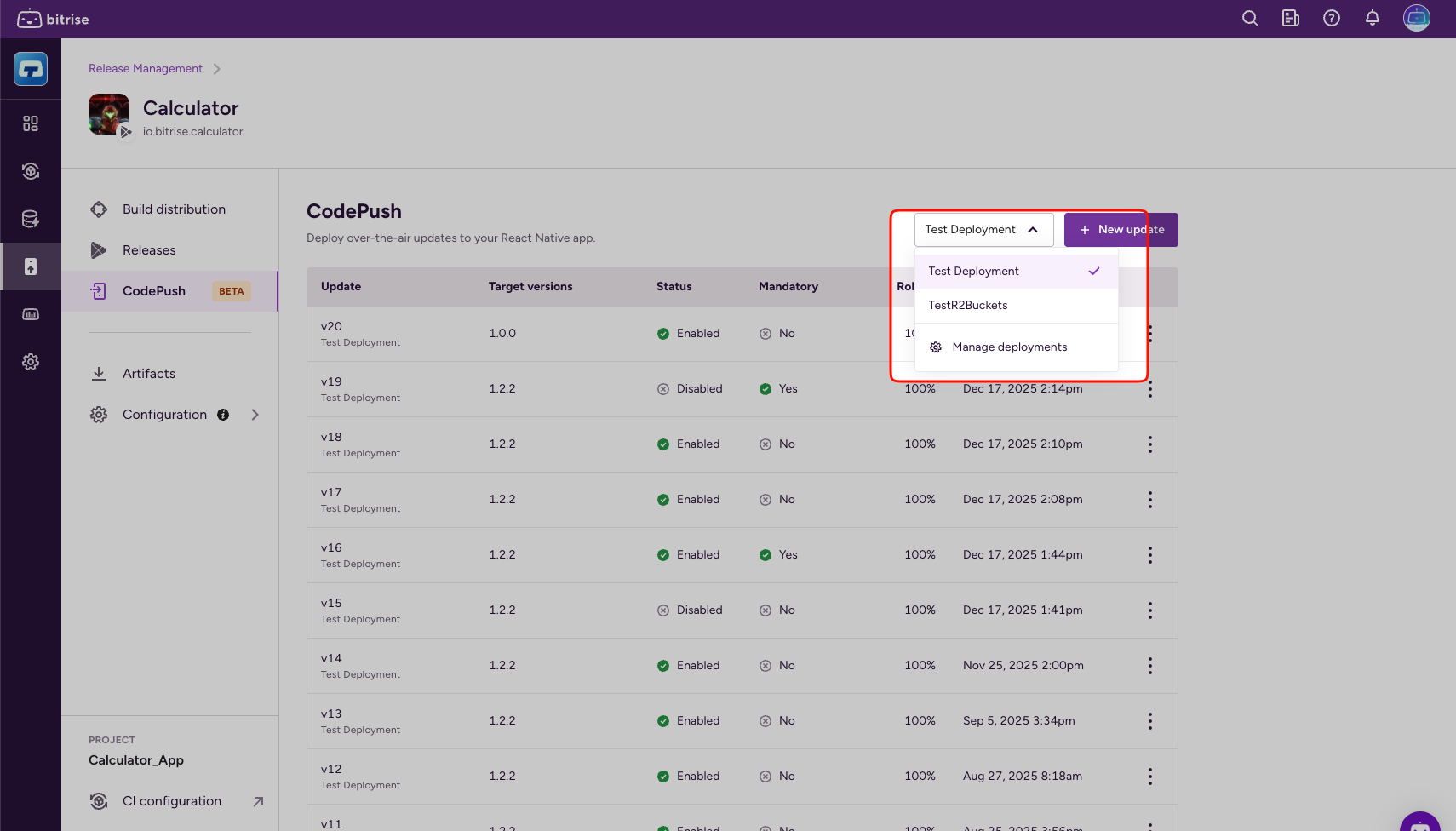
Select your deployment.
-
Click New update.
-
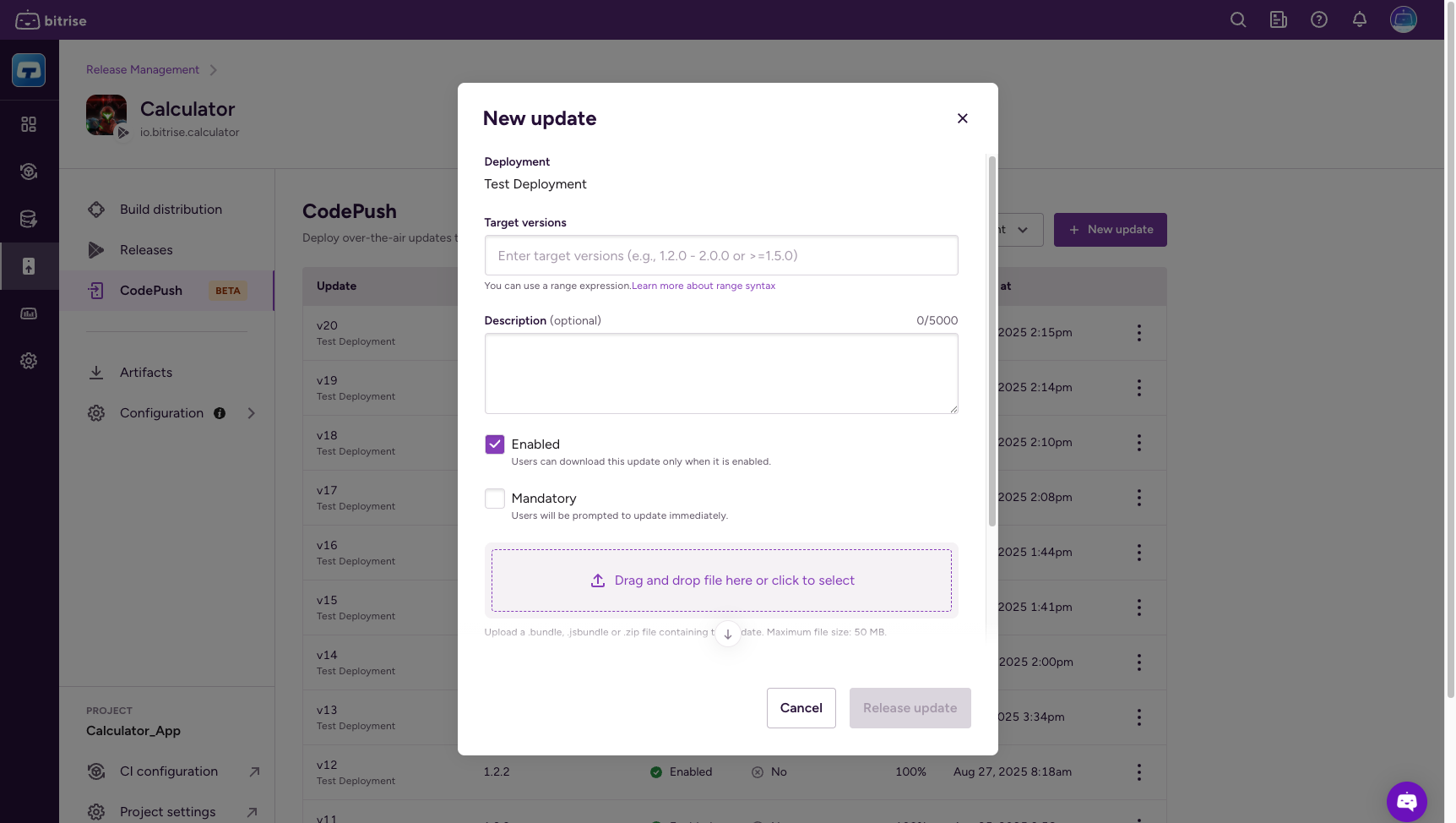
In the Target versions field, add the version range of the update.
You can use range expressions: Target versions.
-
Optionally, add an update description.
-
Check Enabled to make sure users can download the update.
-
Optionally, check Mandatory to prompt users to update immediately.
-
Drag and drop the update file to the drag-and-drop area or click the area and select a file.
File requirements- Upload a
.bundle,.jsbundle, or.zipfile. - The maximum file size is 50 MB.
- Upload a
-
Set the percentage of users that will receive the update in the Rollout percentage field.
You can increase the percentage value later. The default value is 100%.
-
Click Release update.
-
Make sure your CodePush credentials are available: Getting your CodePush credentials.
-
Clone the
release-management-recipesrepository from Bitrise.The repository contains a helper script that we will use to upload the update package.
git clone https://github.com/bitrise-io/release-management-recipes -
Go in to the
release-management-recipesfolder:cd release-management-recipes -
Run the script to upload.
The script requires the following input data:
- The path of the
update.zipfile. - Your Bitrise API token: this can be either a personal access token or a workspace API token.
- A deployment ID.
- The version of your app. For more information, see Target versions.
The final command should look something like this:
UPDATE_PATH=../update.zip \AUTHORIZATION_TOKEN=<api-token> \DEPLOYMENT_ID=<deployment-id> \APP_VERSION=<app-version> /bin/bash ./api/upload_code_push_package.sh - The path of the
Target versionsClick to copy link
When creating an update for CodePush, you need to specify the app version when uploading the package to the CodePush server. This is a target version: users running the specified version of the app will receive the updates.
You can use range expressions to specify the version:
| Range expression | Who gets the update |
|---|---|
| 1.2.3 | Only devices running the specific binary app store version 1.2.3 of your app |
| * | Any device configured to consume updates from your CodePush app |
| 1.2.x | Devices running major version 1, minor version 2 and any patch version of your app |
| 1.2.3 - 1.2.7 | Devices running any binary version between 1.2.3 (inclusive) and 1.2.7 (inclusive) |
| >=1.2.3 <1.2.7 | Devices running any binary version between 1.2.3 (inclusive) and 1.2.7 (exclusive) |
| 1.2 | Equivalent to >=1.2.0 <1.3.0 |
| ~1.2.3 | Equivalent to >=1.2.3 <1.3.0 |
| ^1.2.3 | Equivalent to >=1.2.3 <2.0.0 |