Release automation
You can specify events in the release management process that triggers a selected Workflow or Pipeline. For example, you can create an automation that triggers a Workflow whenever an App Store review is cancelled.
Please note that this feature is only available on a paid plan.
Release Management passes over certain Environment Variables to your builds at the Release candidate stage and later at the Release stage: Available environment variables. You can use these Env Vars in your builds triggered by automations.
To configure a release automation:
Configuring automations for a releaseClick to copy link
You can configure automations separately for each individual release:
-
Log in to Bitrise, and from the left sidebar, select Releases.
-
Select your app from the list.
-
Select Releases and then select your release.
-
Select Configuration on the left navigation bar.
-
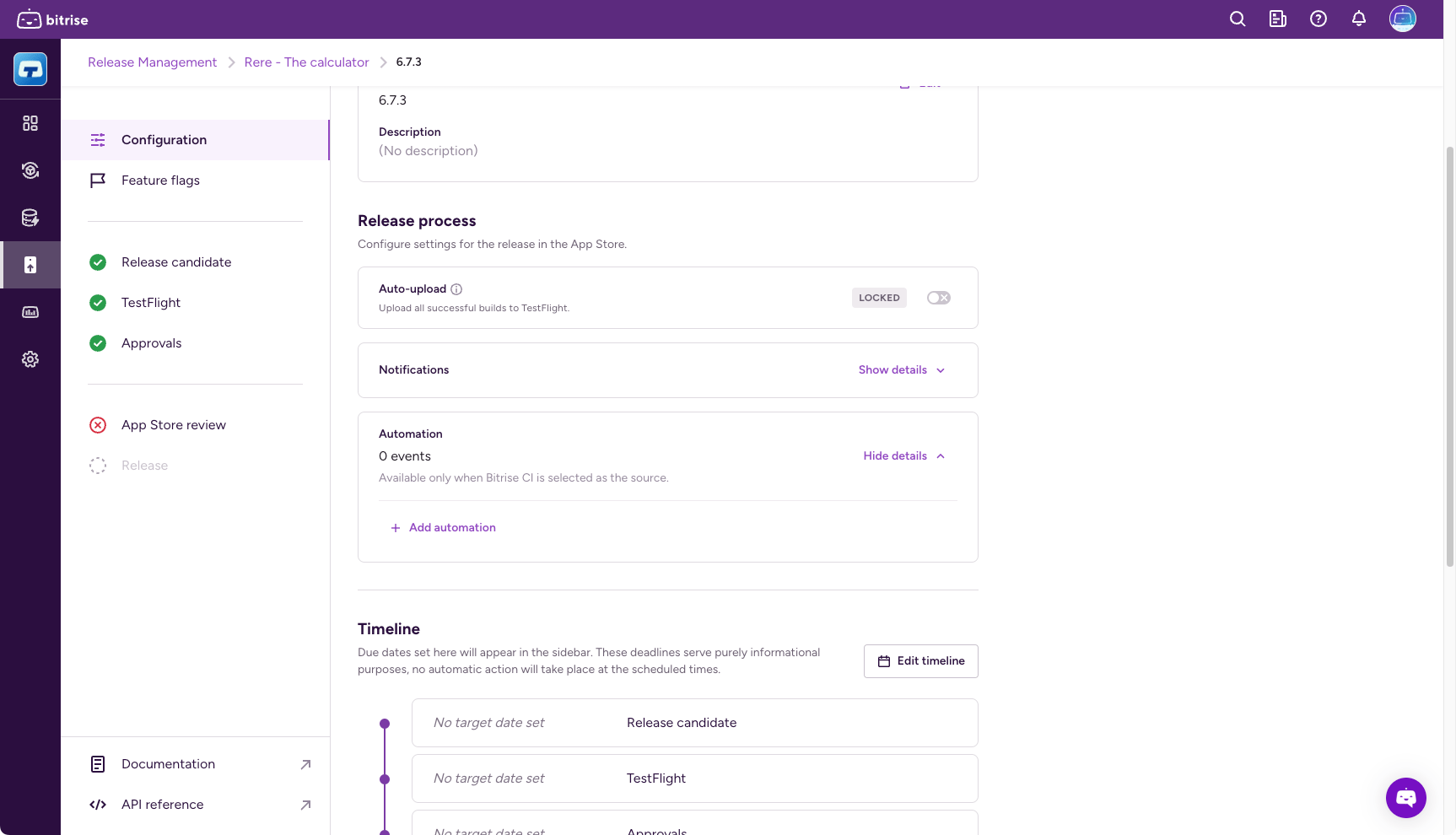
In the Release process section, find Automation.
-
Click Show details and then click Add automation.
-
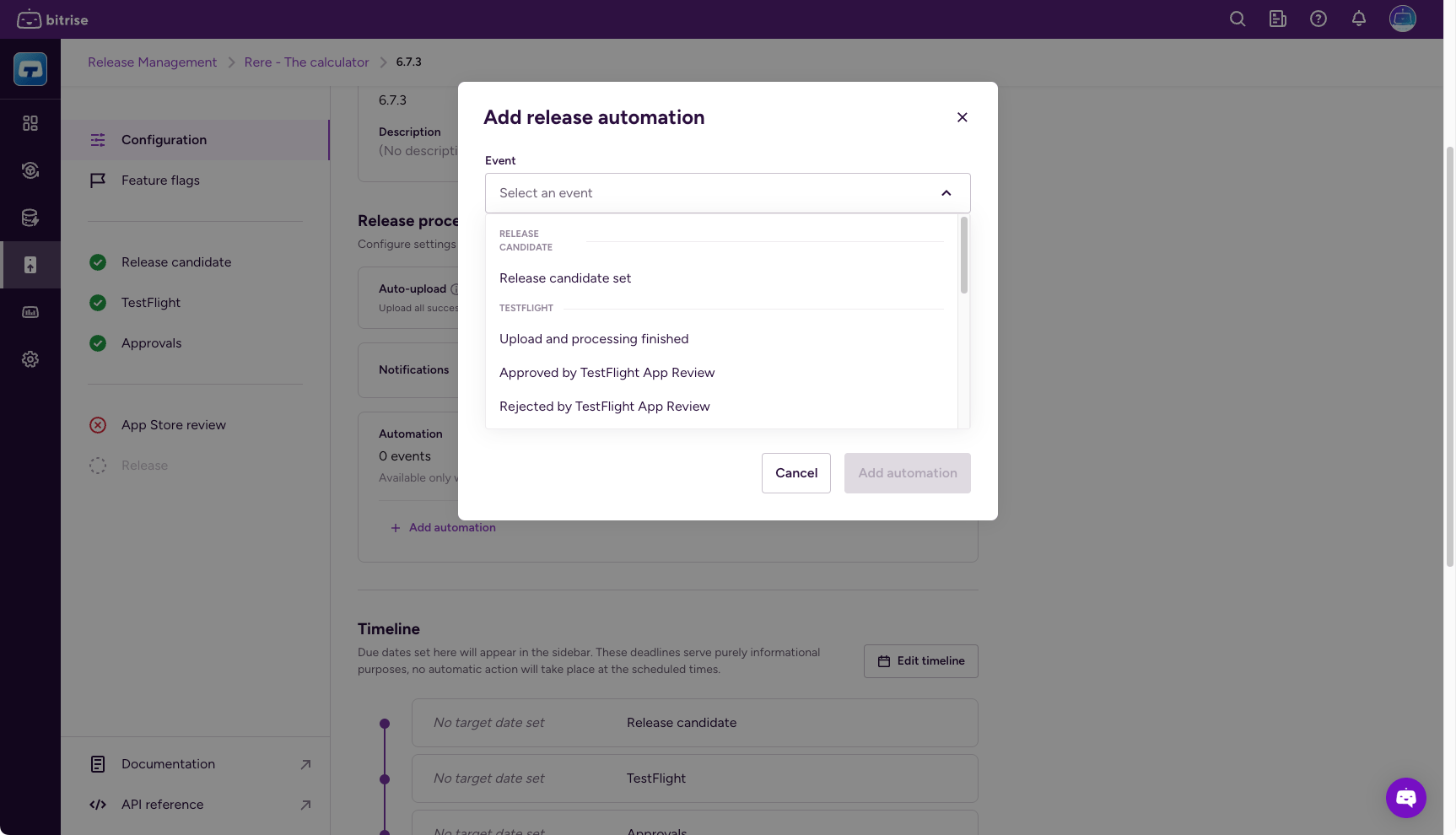
Under the Event field, select a release management event that will trigger the Workflow or Pipeline.
-
Set the automation type to either Workflow or Pipeline.
-
Click Add automation.
Configuring automations as a release presetClick to copy link
You can configure automations as a release preset. These automation settings will be applied to every new release afterwards.
-
Open Release Management and select your app.
-
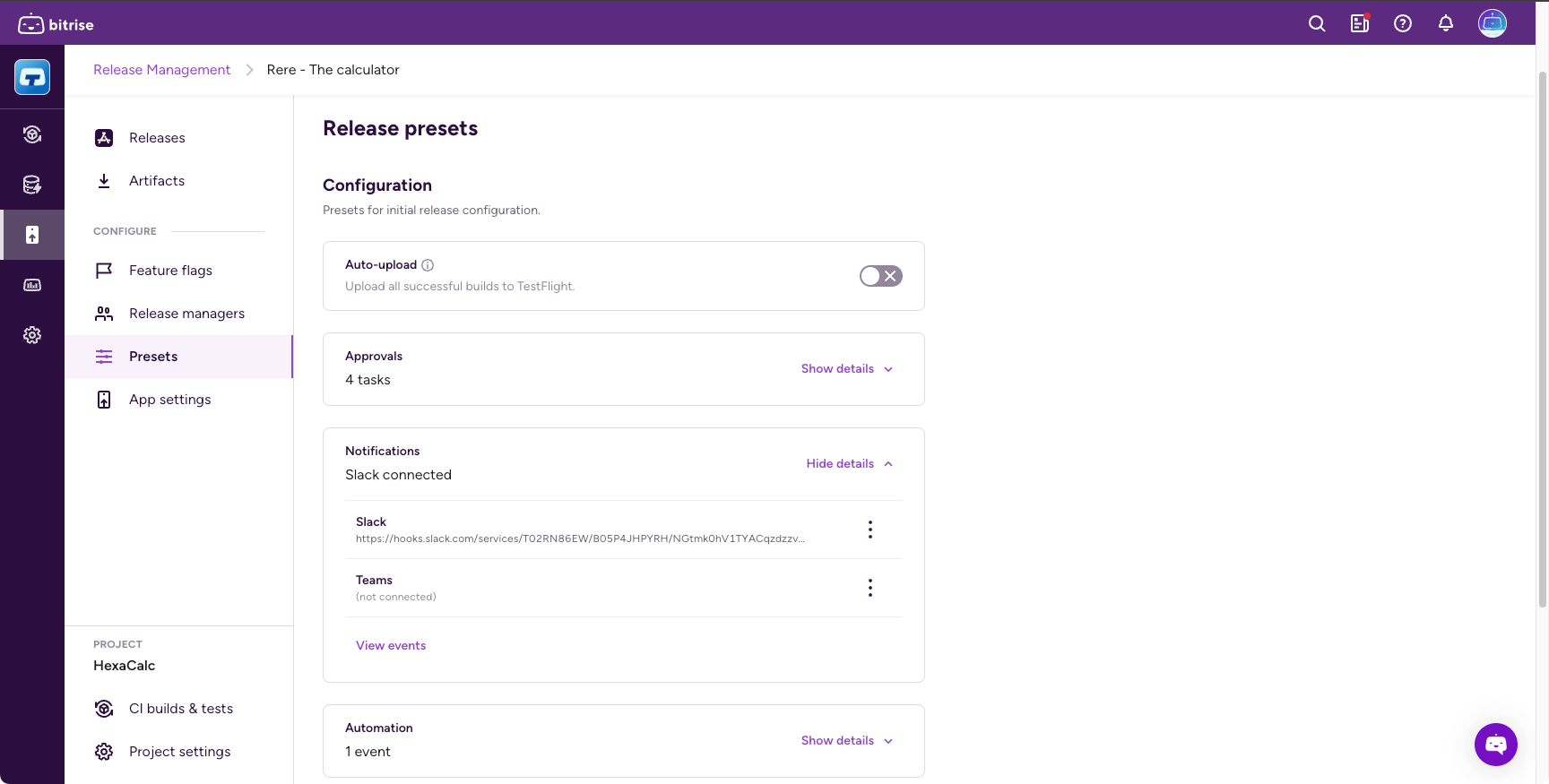
Select Release presets from the left navigation menu.
-
Click the options menu (⋮) next to the name of your preset template and select Change.
-
In the Release process section, find Automation.
-
Click Show details and then click Add automation.
-
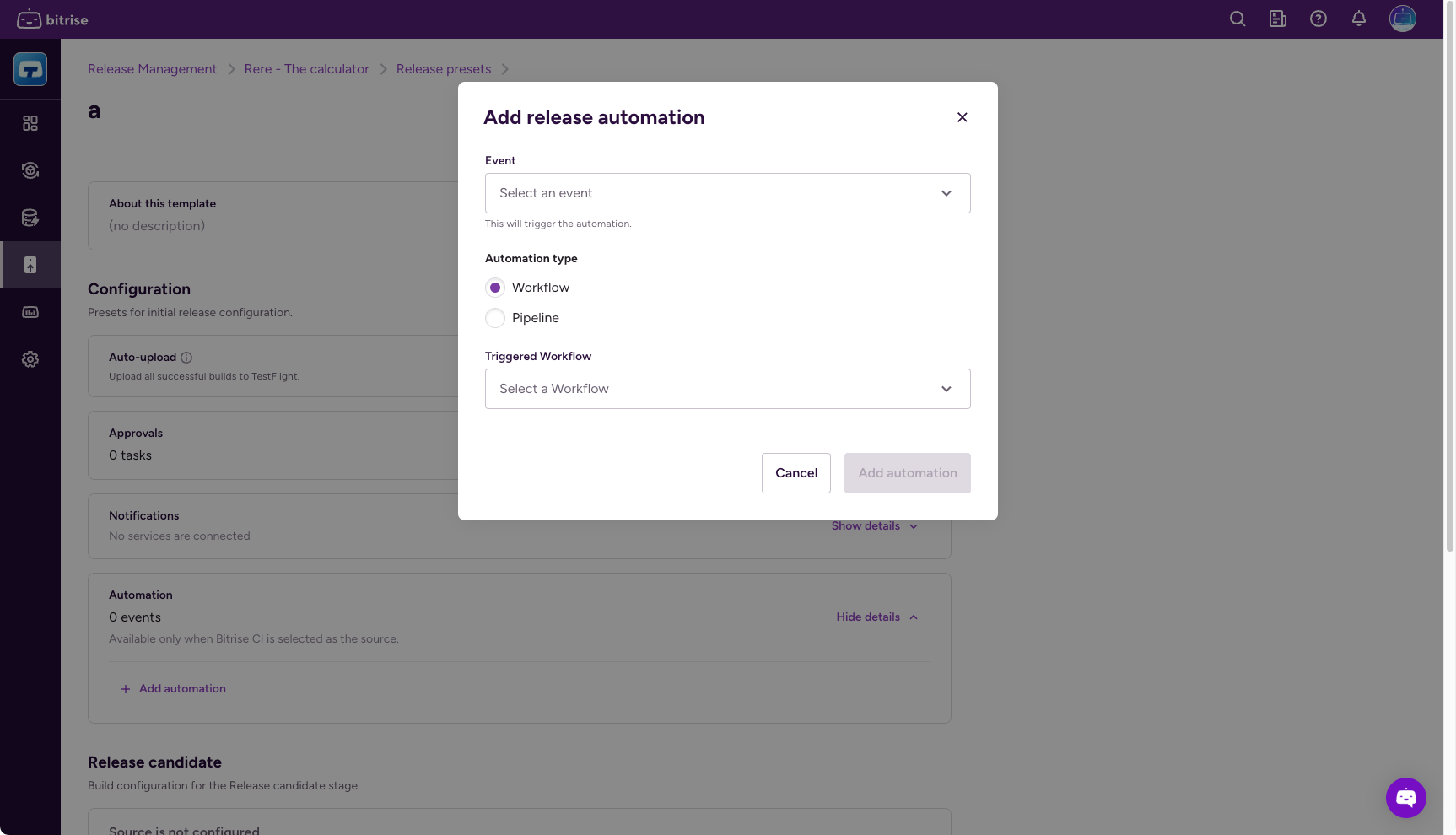
Under the Event field, select a release management event that will trigger the Workflow or Pipeline.
-
Set the automation type to either Workflow or Pipeline.
-
Click Add automation.
Automation eventsClick to copy link
Here you can find all of the events which can trigger Bitrise CI Workflows. Release automations will have an Environment Variable (Env Var), called $RM_EVENT_ID, which identifies the trigger. You can find more Release Management Env Vars in Available Environment Variables.
| Stage | Event | Event description |
|---|---|---|
| Release candidate | Release candidate set Event ID: release_candidate_set | This event is triggered each time there is a new release candidate is selected in the Release candidate stage. This can happen automatically (a new build generated a new IPA) or manually (the release manager locks a specific artifact on the Release candidate stage). |
| TestFlight upload | Upload and processing finished Event ID: testflight_upload_finished | This event is triggered when TestFlight processing is finished for an uploaded IPA. First we upload the IPA to TestFlight, then the TestFlight processing starts. When the processing finishes, we trigger the event. |
| TestFlight upload | Approved by TestFlight App Review Event ID: beta_review_approved | This event is triggered when Apple approves the beta app review that is required for sharing the app with external beta testers. |
| TestFlight upload | Rejected by TestFlight App Review Event ID: beta_review_rejected | This event is triggered when Apple rejects the beta app review that is required for sharing the app with external beta testers. |
| TestFlight upload | Released to TestFlight/App Store testing group Event ID: release_for_apple_app_store_testing_group | This event is triggered when an uploaded build gets released to a TestFlight testing group. |
| Approvals | Release approved Event ID: approvals_completed | This event is triggered when all tasks are approved at the Approval stage. It will not be triggered for each approval, only when all tasks are done. If there are no approval tasks set, the event will trigger immediately after the previous event. |
| App Store review | Release sent for review Event ID: submitted_for_review | This event happens when the store review submission starts. (Release Manager clicks on the submit button, and Apple accepts it) |
| App Store review | Status of review submission changed Event ID: review_status_changed review_cancelled | This event is triggered each time there is a change in the status of the review submission. (Approved, rejected, canceled) |
| Release | Release started Event ID: release_started | This event is triggered after the submission was accepted, and the release rollout started (so the new version becomes available in App Store Connect) |
| Release | Release finished Event ID: release_completed | This event is triggered when the release gets a completed status in Release Management (which means the release is fully rolled out to Google Play or the App Store.) |
| Stage | Event | Event description |
|---|---|---|
| Release candidate | Release candidate set Event ID: release_candidate_set | This event is triggered each time there is a new release candidate is selected in the Release Candidate stage. This can happen automatically (a new build generated a new AAB) or manually (the release manager locks a specific artifact on the Release candidate stage). |
| Google Play upload | Upload and processing finished Event ID: google_play_store_upload_finished | This event is triggered after the AAB is uploaded to Google Play console and is available in the App bundle explorer. |
| Google Play upload | Release on testing track Event ID: release_on_google_play_store_testing_track | This event is triggered after the release candidate is released on a Google Play testing track. |
| Approvals | Release approved Event ID: approvals_completed | This event is triggered when all tasks are approved at the Approval stage. It will not be triggered for each approval, only when all tasks are done. |
| Release | Release started Event ID: release_started | This event is triggered when a release is started. It can be a full release or a staged rollout. For a staged rollout, it only happens once, at the first rollout. |
| Release | Release finished Event ID: release_completed | This event is triggered when release is completed in Release Management. |
| Release | Rollout percentage changed Event ID: release_percentage_changed | This event is triggered if the rollout percentage changes from any percentage other than 0%. For example, if the rollout percentage goes from 10% to 20%. It is NOT triggered when the first rollout happens. |