Configuring Build Hub for GitHub Actions
Create a Bitrise machine pool, and then configure your GitHub Actions workflow to successfully run it on Bitrise Build Hub infrastructure. You need either a GitHub personal access token or a GitHub app to authenticate.
To successfully use Build Hub for GitHub Actions, you need to:
-
Create a machine pool on Bitrise.
The machine pool requires authentication information. You can either:
-
Install the Bitrise - Build Hub GitHub app while creating the machine pool. We recommend this authentication method.
-
-
Configure your GitHub Actions workflow to use Bitrise infrastructure for your builds.
ビルドハブ用の GitHub 個人アクセストークンの作成
注記
このステップはオプションです。Bitrise Build Hub GitHub アプリを使用していない場合にのみ、個人アクセストークンを作成してください
GitHub 個人アクセストークンを使用して、ビルドハブを GitHub Actions に認証できます。必要に応じて、クラシックアクセストークンときめ細かなアクセストークンのどちらかを使用できます。認証の仕組みについて詳しくは、以下をご覧ください。 ビルドハブの認証。
GitHub でトークンを作成するには:
きめ細かい
クラシック
-
ここに記載されているプロセスを実行してください リソース所有者を選択するまで待ってください。
-
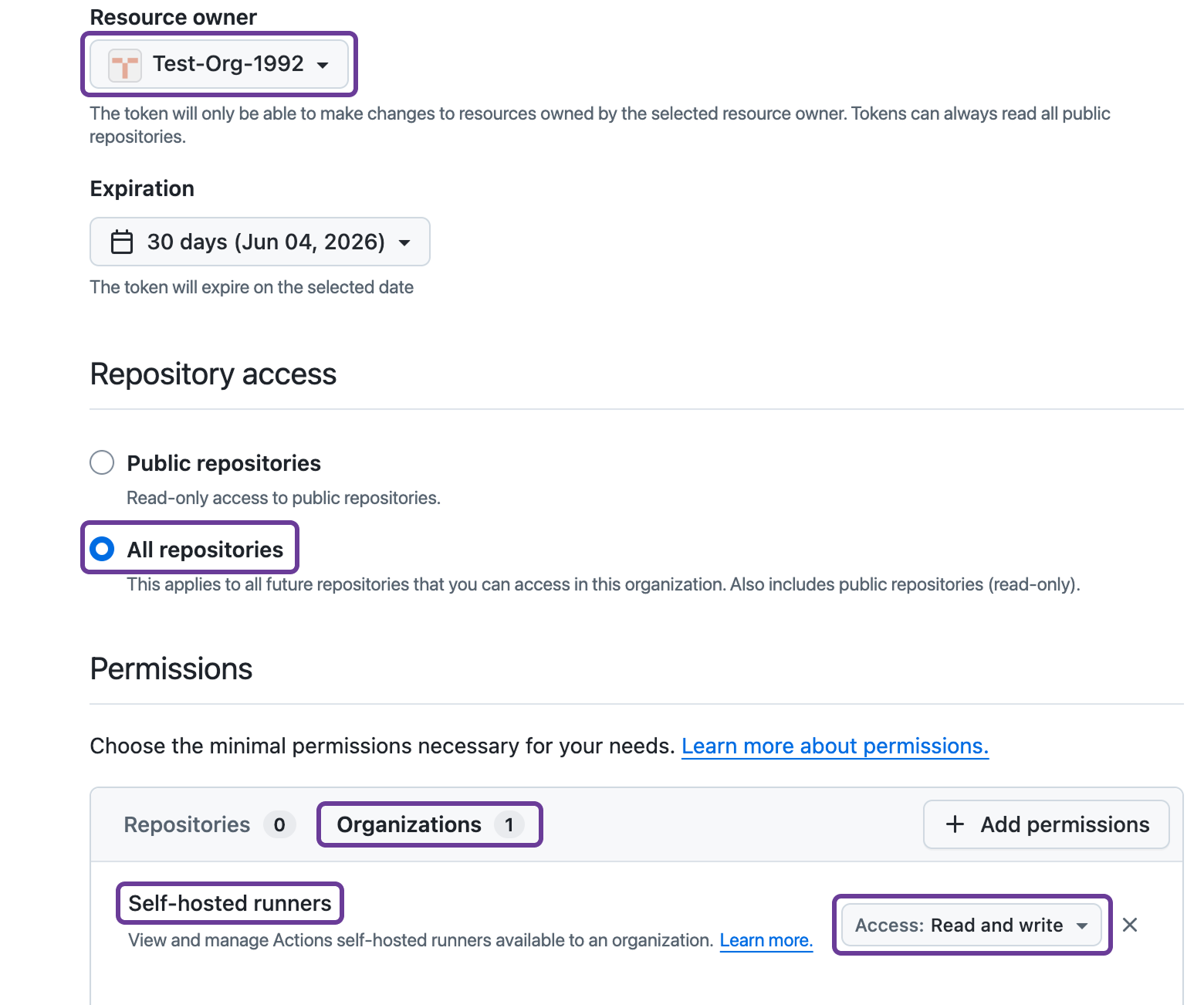
リソース所有者を選択してください。組織でなければなりません。
認可
組織によっては、トークンの認証が必要な場合があります。たとえば、SSO 経由でログインするように求められる場合があります。
-
アンダー リポジトリへのアクセス、選択 すべてのリポジトリ。
-
アンダー 権限、選択してください 組織。
-
クリック 。
-
[選択] セルフホストランナー。
-
アクセスを設定 読み取りと書き込み。
-
クリック 。
-
個人アクセストークンをコピーしてください。二度と表示されなくなりますが、次の場合に必要になります マシンプールの作成。
ターゲットスコープ
さまざまなターゲットスコープに必要な権限を確認してください。 [認証].
-
ここに記載されているプロセスを実行してください スコープの選択に入るまで。
-
適切なスコープを選択してください。マシンプールに必要なターゲットスコープによって異なります。
-
GitHub Cloud organization (
https://github.com/<org>) and GHE organization (https://<hostname>/<org>): org:admin -
GitHub Enterprise (GHE) Cloud (
https://github.com/enterprises/<enterprise>) and GHE Server (https://<hostname>/enterprises/<enterprise>): manage_runners:enterprise. -
GitHub Cloud repository (
https://github.com/<owner>/<repo>) and GHE repository (https://<hostname>/<owner>/<repo>): workflow.
-
-
クリック 。
-
個人アクセストークンをコピーしてください。二度と表示されなくなりますが、次の場合に必要になります マシンプールの作成。
マシンプールの作成
Bitriseハードウェア上でGitHub Actionビルドを実行できるマシンプールを作成します。このプロセスは、使用するかどうかによって少し異なります。 GitHub アプリケーション または GitHub パーソナルアクセストークン 認証用。
GitHub アプリケーション認証
GitHub パーソナルアクセストークン
-
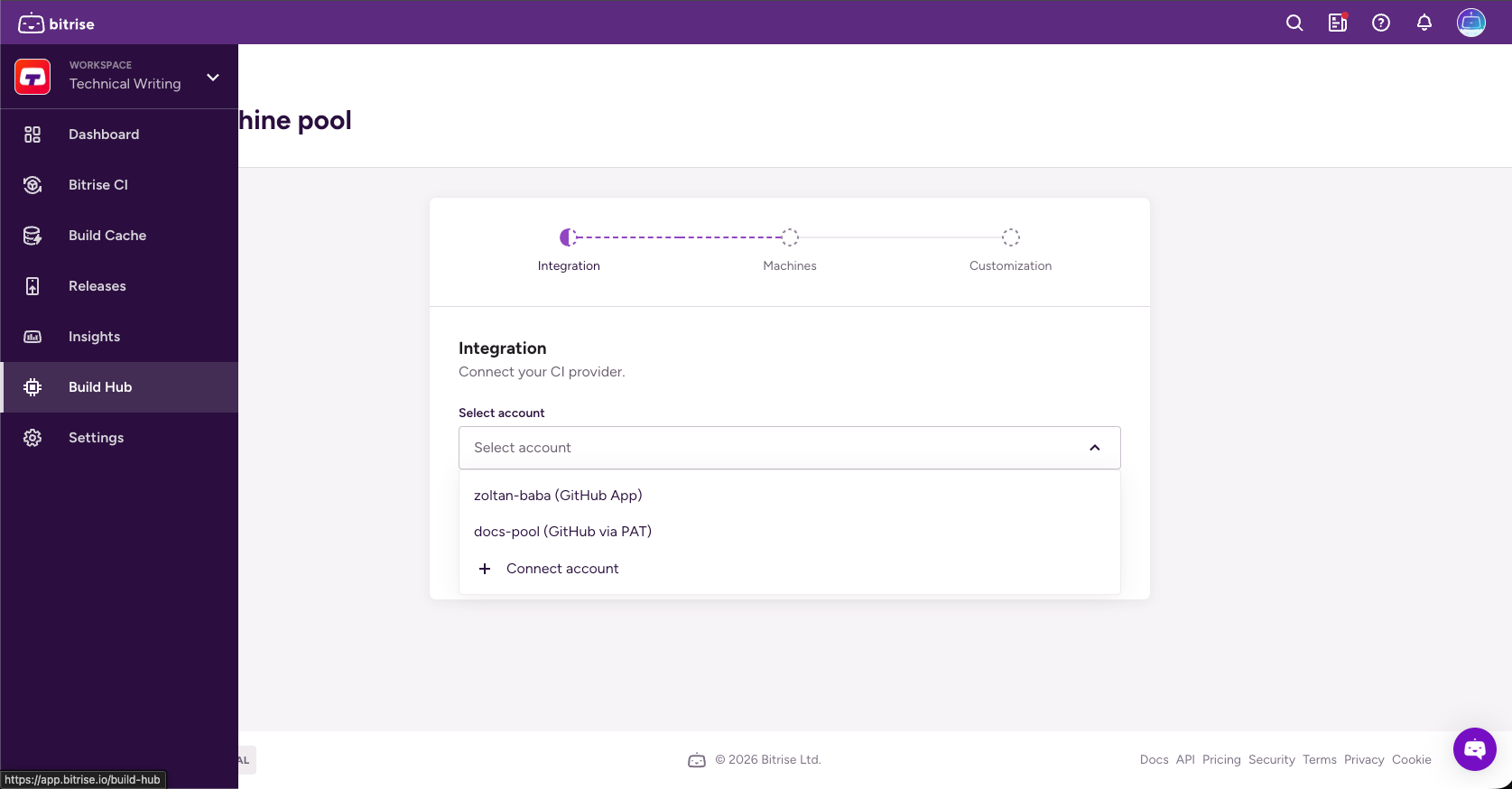
左側のナビゲーションバーで、 ビルドハブ。
-
クリック 。
-
を開く アカウントを選択 ドロップダウンメニューをクリックしてクリック アカウントを接続。
-
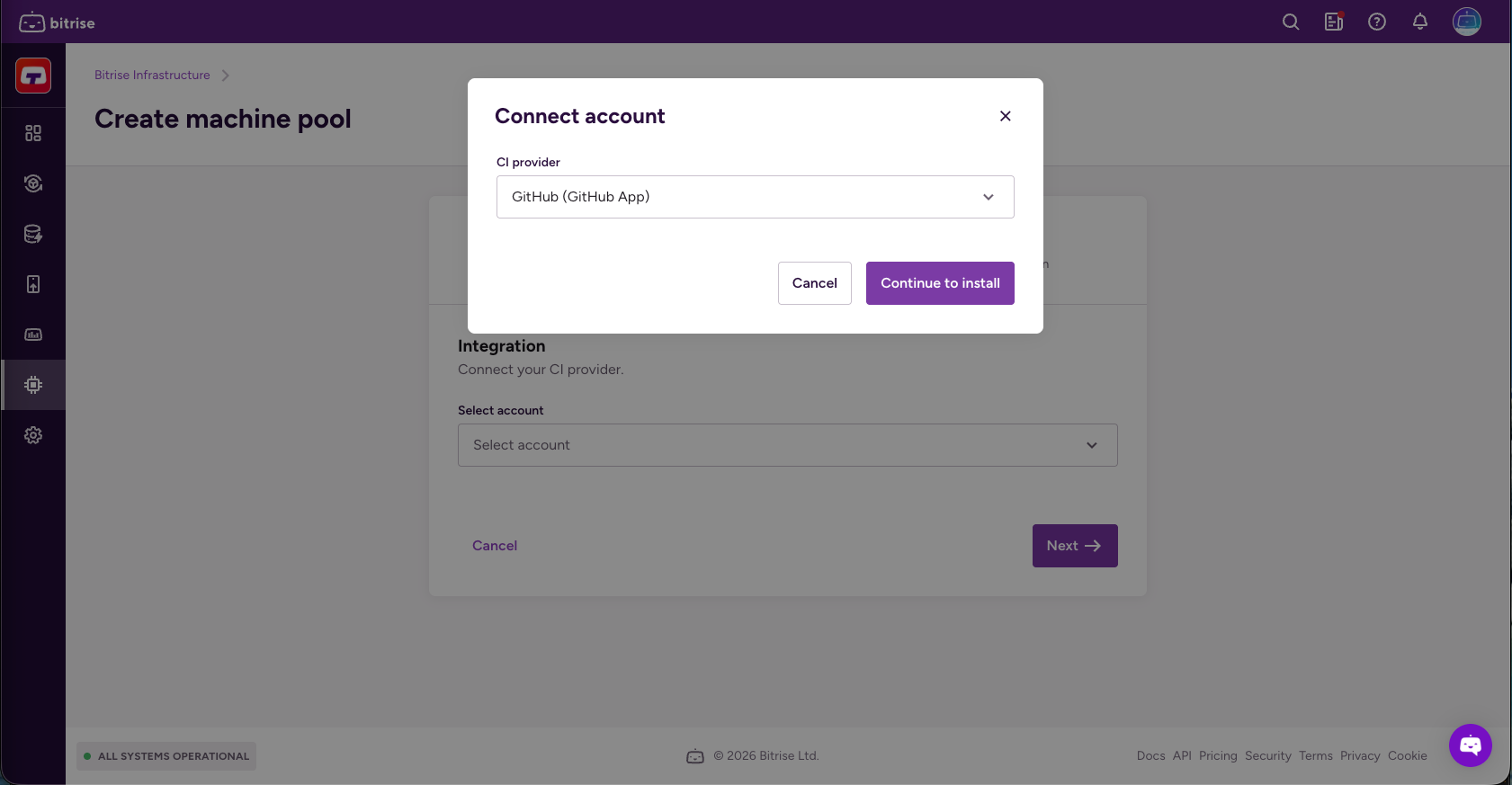
GitHub を選択してください (GitHub アプリケーション) そしてクリック 。
-
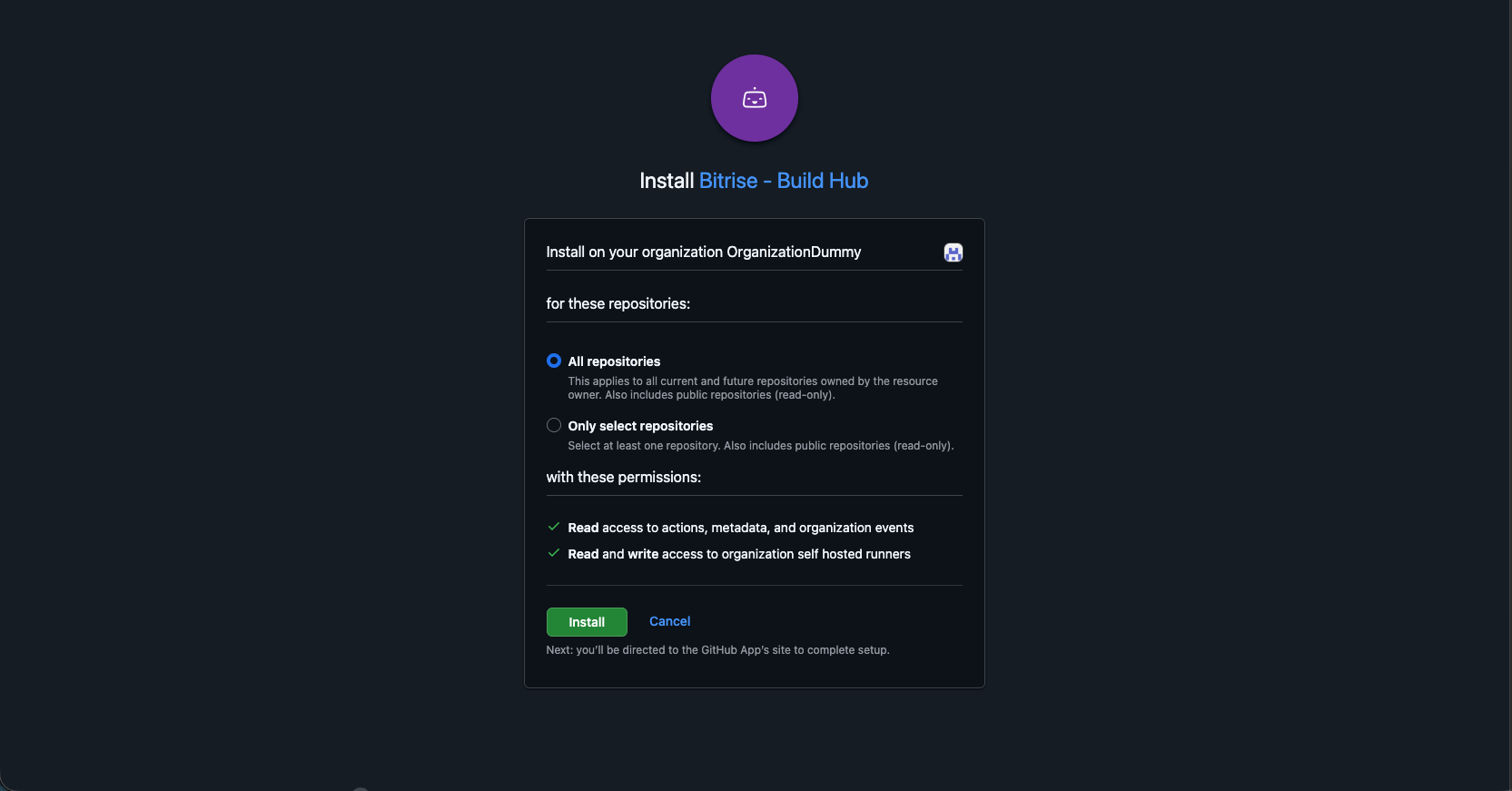
リソース所有者を選択します。
-
リポジトリスコープを選択します。
-
すべてのリポジトリ: リソース所有者が所有する現在および将来のすべてのリポジトリに適用されます。パブリックリポジトリ (読み取り専用) も含まれます
-
リポジトリのみを選択: リポジトリを少なくとも 1 つ選択してください。パブリックリポジトリ (読み取り専用) も含まれます
-
-
ランナーグループとオプションでランナーバージョンを追加し、をクリックします。 [次へ]。
-
ランナーのバージョンは v2.328.0 のように正確である必要があります。ランナーバージョンを指定しない場合、最新バージョンが使用されます
-
ランナーグループ 複数のランナーを集め、その周囲にセキュリティ境界を設けるために使用されます。
-
-
Check Use Bitrise for GitHub Actions caching if you want Bitrise infrastructure to handle GitHub Actions cache requests instead of GitHub's cache backend.
This results in faster cache operations.
-
Click .
-
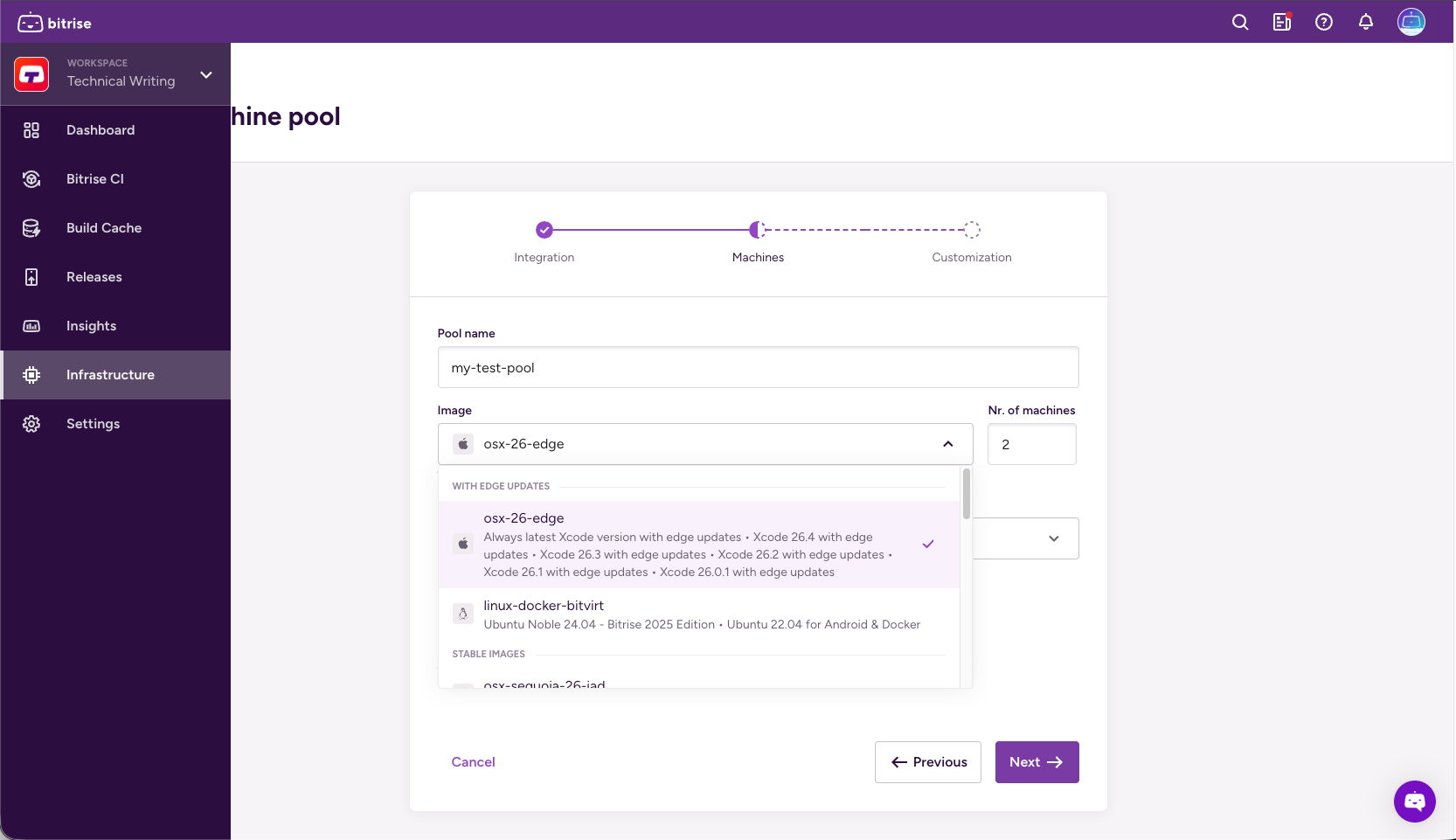
プールに一意の名前を設定します。
-
で画像を選択します [イメージ] ドロップダウンメニューと必要なマシンの数 マシン数 フィールド。
で画像を確認できます スタックレポートページ。
-
マシンタイプを選択します。
Bitriseマシンの詳細については、以下をご覧ください マシンを構築する。
-
ローリングアップデートの割合を設定します。これは、再構成後に同時に再起動されるマシンの数です。
-
完了したら、をクリックします 。
-
ラベルの作成:次のことが可能になります GitHub アクション設定 Bitrise ランナープールをターゲットにするためです。少なくとも 1 つのラベルが必要です
ラベルはキーと値のペアですが、必須はキーだけです。デフォルトでは、Bitriseはプール名、イメージ、マシンタイプのラベルを提案します。これらはいつでも変更できます
-
オプションで、ウォームアップスクリプトを追加してビルド環境をカスタマイズします。完了したら、をクリックします 。
ウォームアップスクリプトが必要ない場合は空のままにしてください。
0 以外の終了コード
エラーが発生した場合は、必ず 0 以外の終了コードを返すようにしてください。スクリプトが失敗するのは、スクリプトが 0 以外の終了コードを返した場合だけです
-
左側のナビゲーションバーで、 ビルドハブ。
-
クリック 。
-
を開く アカウントを選択 ドロップダウンメニューをクリックしてクリック アカウントを接続。
-
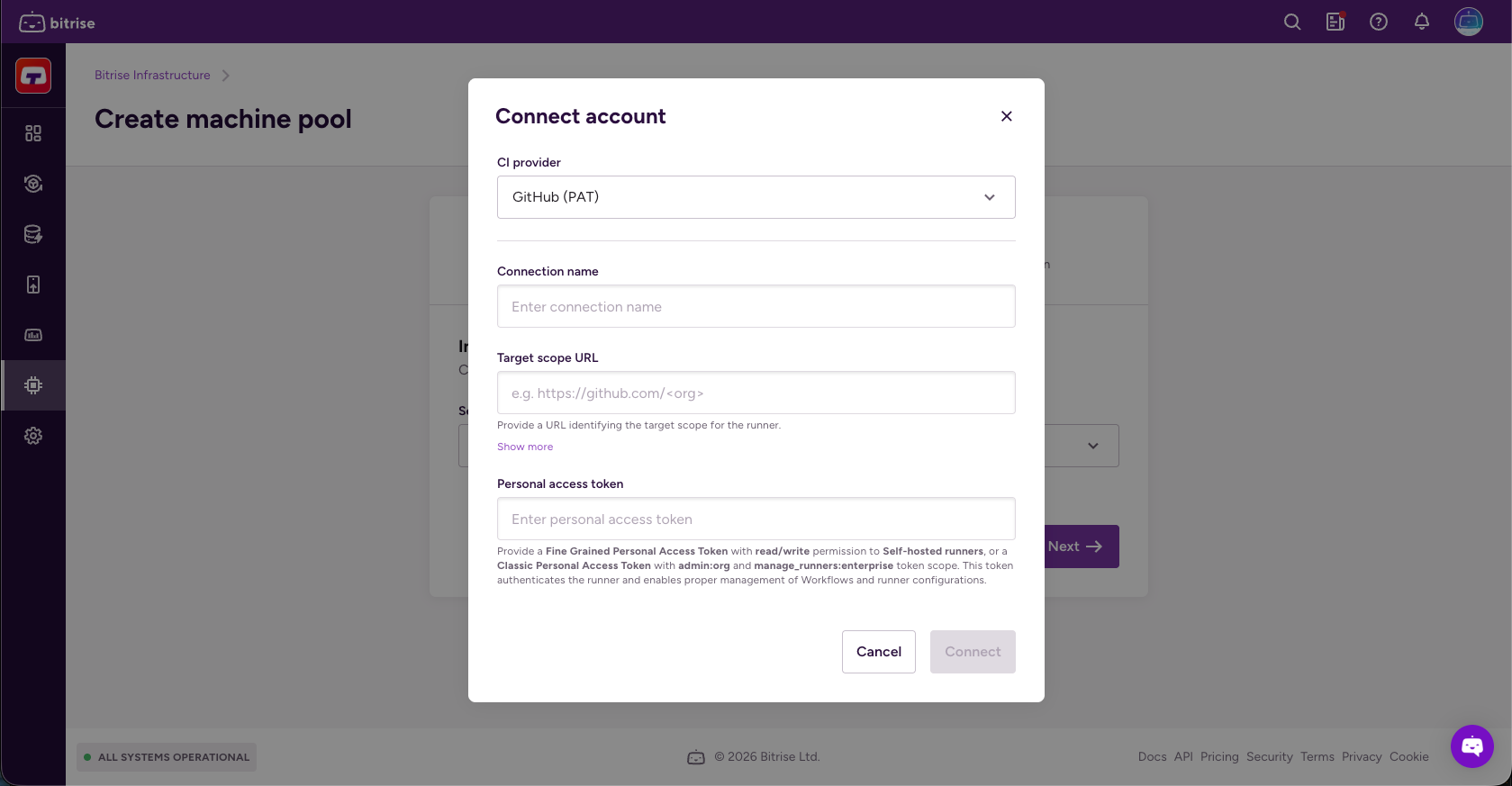
クリック アカウントを接続 そして選択してください GitHub (PAT)。
-
接続名とターゲットスコープ URL を設定します。
ターゲットスコープの詳細については、こちらをご覧ください。 ターゲットスコープ
-
の中に 個人アクセストークン フィールドに GitHub 個人アクセストークンを追加してクリック [接続]。
-
ランナーグループと、オプションでランナーバージョンを追加します。
-
ランナーのバージョンは v2.328.0 のように正確である必要があります。ランナーバージョンを指定しない場合、最新バージョンが使用されます
-
ランナーグループ 複数のランナーを集め、その周囲にセキュリティ境界を設けるために使用されます。
-
-
Check Use Bitrise for GitHub Actions caching if you want Bitrise infrastructure to handle GitHub Actions cache requests instead of GitHub's cache backend.
This results in faster cache operations.
-
Click .
-
プールに一意の名前を設定します。
-
で画像を選択します [イメージ] ドロップダウンメニューと必要なマシンの数 マシン数 フィールド。
で画像を確認できます スタックレポートページ。
-
マシンタイプを選択します。
Bitriseマシンの詳細については、以下をご覧ください マシンを構築する。
-
ローリングアップデートの割合を設定します。これは、再構成後に同時に再起動されるマシンの数です。
-
完了したら、をクリックします 。
-
ラベルの作成:次のことが可能になります GitHub アクション設定 Bitrise ランナープールをターゲットにするためです。少なくとも 1 つのラベルが必要です
ラベルはキーと値のペアですが、必須はキーだけです。デフォルトでは、Bitriseはプール名、イメージ、マシンタイプのラベルを提案します。これらはいつでも変更できます
-
オプションで、ウォームアップスクリプトを追加してビルド環境をカスタマイズします。完了したら、をクリックします 。
ウォームアップスクリプトが必要ない場合は空のままにしてください。
0 以外の終了コード
エラーが発生した場合は、必ず 0 以外の終了コードを返すようにしてください。スクリプトが失敗するのは、スクリプトが 0 以外の終了コードを返した場合だけです
GitHub アクションワークフローを設定する
マシンプールを正常に作成したら、ビルドの実行時にマシンプールを使用するように GitHub Actions ワークフローを設定する必要があります。
を使う runs-on Bitrise マシンを指定するためのワークフロー内のプロパティ。ランナーに割り当てられたラベルに基づいてランナーをターゲットにできます
-
GitHub リポジトリを開いて選択してください アクション。
-
左側で、ワークフローの名前をクリックします。
-
ワークフローの名前の下で、をクリックします デプロイ.yml。
-
を追加
runs-onBuild Hub で実行したいジョブのプロパティ。次の場合に作成するラベルをターゲットにする必要があります マシンプールの作成または更新。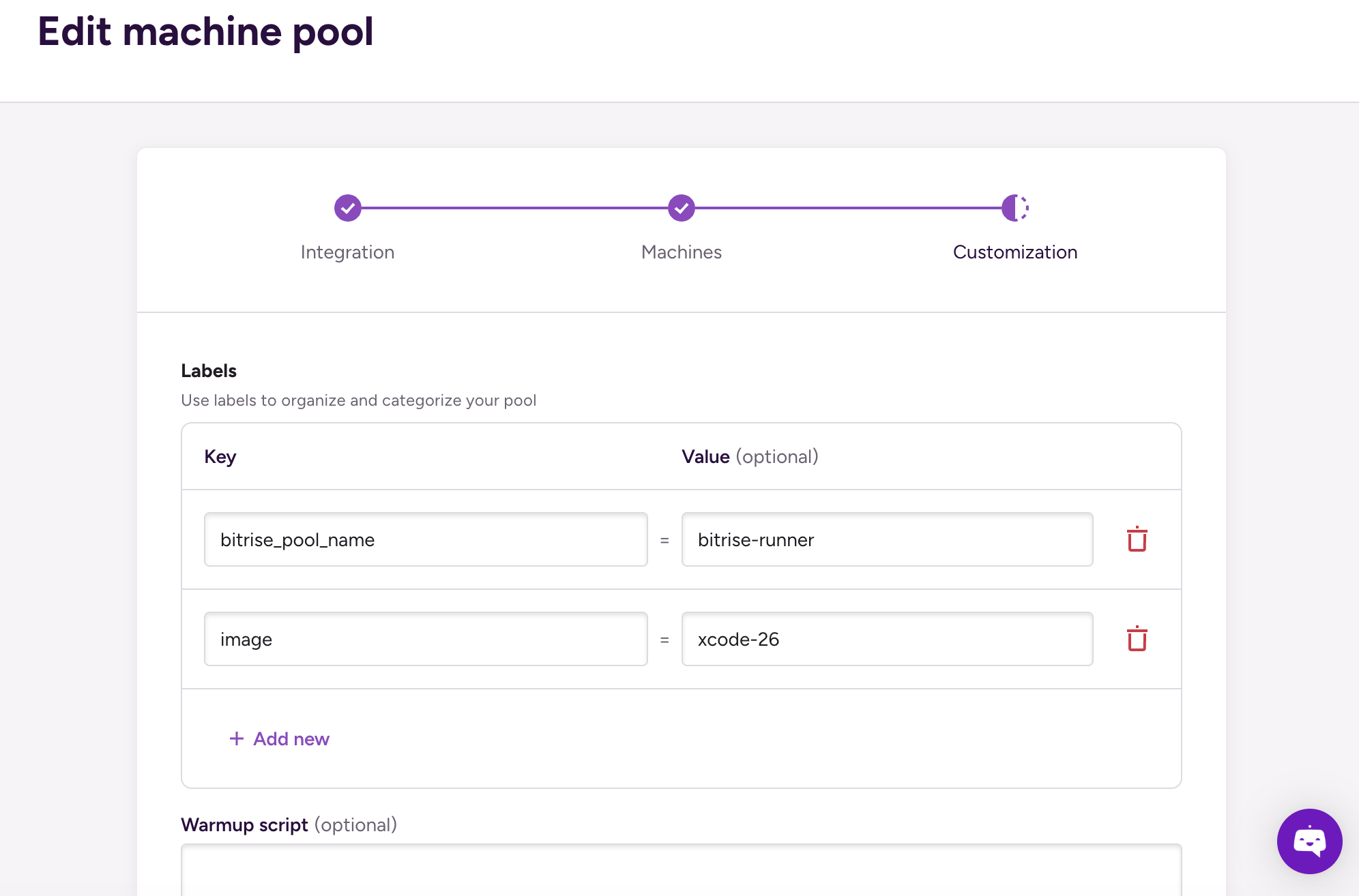
-
ラベルは 1 つだけ使用できます。これにより、指定したラベルを持つすべてのランナーが使用できるようになります
jobs: build: runs-on: image:xcode-26 -
ラベルの配列を使用できます。ランナーが許可されるのは、指定されたラベルがすべて揃っている場合だけです。
jobs:
  build:
    runs-on: [bitrise_pool_name:bitrise-runner, image:xcode-26]
-
についての詳細は runs-on プロパティ、チェックして GitHub アクションドキュメンテーション。
Linux マシンがツールにアクセスできるようにする
Linuxマシンでは、ビルドハブでGitHub Actionsワークフローを実行するときに、Linuxイメージにプリインストールされているツールにアクセスするための回避策が必要です。
GitHub Actions ワークフローがを使用するとき container: Docker コンテナ内のステップを実行するプロパティです。ランナーはイメージのツール設定を壊すような方法で環境を変更します。つまり、ビルドはアクセスできないということです asdf ツールマネージャーなので、プリインストールされているツールにはアクセスできません。
問題を解決するには:
-
を追加
envGitHub Actions ワークフローのコンテナ設定へのプロパティ。3 つの環境変数を設定するとasdfそのコアスクリプトとプラグイン、インストール済みバージョン、シムがどこにあるか、そしてイメージのスクリプトをオーバーライドするにはBASH_ENV=/.bashrc。container: image: bitriseio/ubuntu-noble-24.04-bitrise-2025-android:latest env: ASDF_DIR: /root/.asdf ASDF_DATA_DIR: /root/.asdf BASH_ENV: /root/.asdf/asdf.sh -
の下に
defaultsプロパティ、デフォルトシェルをに設定bash。container: image: bitriseio/ubuntu-noble-24.04-bitrise-2025-android:latest env: ASDF_DIR: /root/.asdf ASDF_DATA_DIR: /root/.asdf BASH_ENV: /root/.asdf/asdf.sh defaults: run: shell: bash -
の下に
stepsプロパティ、イメージのデフォルトツールバージョンを次の場所にコピーするステップを追加asdf彼らを期待しています。steps: - name: Setup environment run: | cp /root/.tool-versions "$HOME/.tool-versions" -
すべての作業ディレクトリを安全なものとして扱うように Git に指示してください。これがないと、ディレクトリの所有権が一致しないために一部のコマンドが失敗する可能性があります
steps: - name: Setup environment run: | cp /root/.tool-versions "$HOME/.tool-versions" git config --global --add safe.directory '*'