OIDC authentication overview
OpenID Connect (OIDC) is an identity authentication layer built on the OAuth 2.0 framework. It allows third-party applications to verify the identity of the end user, including using Single Sign-On across applications.
OIDC works by issuing ID tokens (typically JSON Web Tokens or JWTs) that provide information about the authentication operation's outcome and about the user's identity. The data about the authentication outcome and the user information are called claims.
The service that receives the token evaluates the token's claims against its OIDC policy. If the token's claims match the policy, the request is permitted; if they don't, it is rejected.
Bitrise supports the use of OIDC tokens in two ways:
- To enable your Bitrise builds to authenticate to external systems such as AWS, GCP, Azure, container registries, secret management or artifact stores.
- To use foreign OIDC tokens to authenticate to Bitrise and receive short-lived Bitrise tokens.
Authentication to external services with OIDCClick to copy link
OIDC enables your builds to authenticate to external systems (such as AWS, GCP, Azure, container registries, secret management or artifact stores) without embedding long-lived credentials in your Workflows. Bitrise can mint one or more identity tokens tied to a specific build, with claims such as a build number, commit hash, repository slug, app slug, or Workflow name.
These tokens are:
- Issued for a particular build interaction so third-party services can grant access scoped only to that run.
- Short-lived to minimize the consequences of potential exposure.
- Consumable by federated services that accept OIDC: for example, you can exchange a Bitrise OIDC token for temporary cloud credentials.
Request an identity token for your buildClick to copy link
To use an OIDC token to authenticate to a service from a Bitrise build, you need to fetch the token and then perform the credential exchange with the service. Bitrise offers Steps that handle parts of the process.
Get OIDC Identity Token StepClick to copy link
Use an OIDC token in your build for any service with the Get OIDC Identity Token Step. This Step lets your Workflows and Pipelines request temporary, auditable access to cloud resources or external services at runtime, without storing secrets in the repository or build configuration.
Set the Token audience input to configure the Step. This could be the URL of the service you want to access with the token or a specific identifier provided by the service.
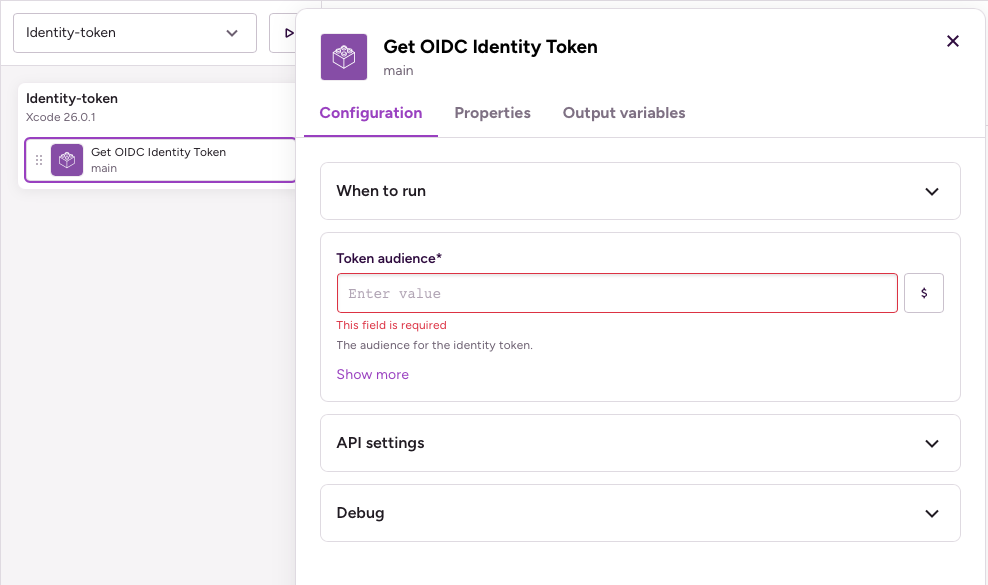
The Step exports an Environment Variable with the key BITRISE_IDENTITY_TOKEN, containing the relevant information of the token. Use it to exchange credentials with the service you want to access.
Dedicated Steps for specific servicesClick to copy link
The Get OIDC Identity Token Step lets you fetch an OIDC token for any service but it doesn't perform the credential exchange for you. For some services, we have Steps that take the care of the whole process:
- Authenticate with Google Cloud Platform (GCP): Generates a Google auth token using a service account key, and authenticates to GCP.
- Authenticate with Amazon Web Services (AWS): Generates an identity token based on an AWS IAM identity provider. You can read our full guide here: OIDC for AWS.
Information in the OIDC tokenClick to copy link
Bitrise includes the following information in the OIDC token:
As Bitrise is considered a generic identity provider, AWS keeps only two claims from our token: aud and sub. You can only use these in your policies.
You can find more information about claim fields in the AWS documentation.
Name | Description |
|---|---|
aud | Customizable audience field |
sub | The subject that triggered the ID token creation It will be in the app:APP_SLUG:workflow:WORKFLOW format. |
exp | The token expiration time |
iat | The time of the token generation |
iss | Who issued the token |
jti | Token unique identifier |
nbf | The current time |
sha | Git commit hash |
repository_url | The url of the app's associated git repo |
repository_owner | The git repository owner |
repository_slug | Git repository slug |
app_slug | App slug |
workspace_slug | Workspace slug |
trigger_by | What entity triggered the build |
branch | The branch that is getting built |
branch_dest | PR target branch |
tag | The tag which triggered the build |
build_number | Build number |
workflow | Name of the triggered workflow |
Authentication to Bitrise with OIDCClick to copy link
Bitrise supports using external OIDC tokens to authenticate to Bitrise and receive short-lived Bitrise workspace access tokens. The issued token will be matched against your Bitrise trust policy.
A service that receives a Bitrise token essentially becomes a temporary member of your workspace that can perform certain actions defined in your trust policy. For example, it can receive data from a build triggered on a specific branch of a given repository.
Trust policyClick to copy link
An OIDC trust policy defines who to trust, under what conditions, and how to validate the OIDC tokens. A Bitrise trust policy defines:
- The OIDC issuers that Bitrise will trust. Claims from OIDC providers that aren't listed as issuers in our trust policy are automatically rejected.
- The duration of the short-lived token: how long it is valid.
- Its level of access: the roles and permissions it grants in workspaces and projects.
- The matching rules of the token: the claims that must be matched. For example, the claim can include the repository, the branch of the repository, the Workflow that should be triggered. The matching rules are in a JSON format.
OIDC token requestClick to copy link
After a policy is successfully created, Bitrise automatically generates a unique policy ID. This policy ID must be included in every token request.
When a service sends an OIDC token to request a short-lived Bitrise workspace access token, Bitrise matches the policy ID in the request to the corresponding trust policy and checks that trust policy's matching rules. If the rules match the OIDC token's claims, the short-lived token is granted.